Compression and Data Block Encoding In HBase
Comprehensive guide to compression algorithms and data block encoding options in HBase for optimizing storage and performance.
Codecs mentioned in this section are for encoding and decoding data blocks or row keys. For information about replication codecs, see cluster.replication.preserving.tags.
HBase supports several different compression algorithms which can be enabled on a ColumnFamily. Data block encoding attempts to limit duplication of information in keys, taking advantage of some of the fundamental designs and patterns of HBase, such as sorted row keys and the schema of a given table. Compressors reduce the size of large, opaque byte arrays in cells, and can significantly reduce the storage space needed to store uncompressed data.
Compressors and data block encoding can be used together on the same ColumnFamily.
Changes Take Effect Upon Compaction
If you change compression or encoding for a ColumnFamily, the changes take effect during compaction.
Some codecs take advantage of capabilities built into Java, such as GZip compression. Others rely on native libraries. Native libraries may be available via codec dependencies installed into HBase's library directory, or, if you are utilizing Hadoop codecs, as part of Hadoop. Hadoop codecs typically have a native code component so follow instructions for installing Hadoop native binary support at Making use of Hadoop Native Libraries in HBase.
This section discusses common codecs that are used and tested with HBase.
No matter what codec you use, be sure to test that it is installed correctly and is available on all nodes in your cluster. Extra operational steps may be necessary to be sure that codecs are available on newly-deployed nodes. You can use the compression.test utility to check that a given codec is correctly installed.
To configure HBase to use a compressor, see compressor.install. To enable a compressor for a ColumnFamily, see changing.compression. To enable data block encoding for a ColumnFamily, see data.block.encoding.enable.
Block Compressors
- NONE
This compression type constant selects no compression, and is the default. - BROTLI
Brotli is a generic-purpose lossless compression algorithm that compresses data using a combination of a modern variant of the LZ77 algorithm, Huffman coding, and 2nd order context modeling, with a compression ratio comparable to the best currently available general-purpose compression methods. It is similar in speed with GZ but offers more dense compression. - BZIP2
Bzip2 compresses files using the Burrows-Wheeler block sorting text compression algorithm and Huffman coding. Compression is generally considerably better than that achieved by the dictionary- (LZ-) based compressors, but both compression and decompression can be slow in comparison to other options. - GZ
gzip is based on the DEFLATE algorithm, which is a combination of LZ77 and Huffman coding. It is universally available in the Java Runtime Environment so is a good lowest common denominator option. However in comparison to more modern algorithms like Zstandard it is quite slow. - LZ4
LZ4 is a lossless data compression algorithm that is focused on compression and decompression speed. It belongs to the LZ77 family of compression algorithms, like Brotli, DEFLATE, Zstandard, and others. In our microbenchmarks LZ4 is the fastest option for both compression and decompression in that family, and is our universally recommended option. - LZMA
LZMA is a dictionary compression scheme somewhat similar to the LZ77 algorithm that achieves very high compression ratios with a computationally expensive predictive model and variable size compression dictionary, while still maintaining decompression speed similar to other commonly used compression algorithms. LZMA is superior to all other options in general compression ratio but as a compressor it can be extremely slow, especially when configured to operate at higher levels of compression. - LZO
LZO is another LZ-variant data compression algorithm, with an implementation focused on decompression speed. It is almost but not quite as fast as LZ4. - SNAPPY
Snappy is based on ideas from LZ77 but is optimized for very high compression speed, achieving only a "reasonable" compression in trade. It is as fast as LZ4 but does not compress quite as well. We offer a pure Java Snappy codec that can be used instead of GZ as the universally available option for any Java runtime on any hardware architecture. - ZSTD
Zstandard combines a dictionary-matching stage (LZ77) with a large search window and a fast entropy coding stage, using both Finite State Entropy and Huffman coding. Compression speed can vary by a factor of 20 or more between the fastest and slowest levels, while decompression is uniformly fast, varying by less than 20% between the fastest and slowest levels.
ZStandard is the most flexible of the available compression codec options, offering a compression ratio similar to LZ4 at level 1 (but with slightly less performance), compression ratios comparable to DEFLATE at mid levels (but with better performance), and LZMA-alike dense compression (and LZMA-alike compression speeds) at high levels; while providing universally fast decompression.
Data Block Encoding Types
Prefix
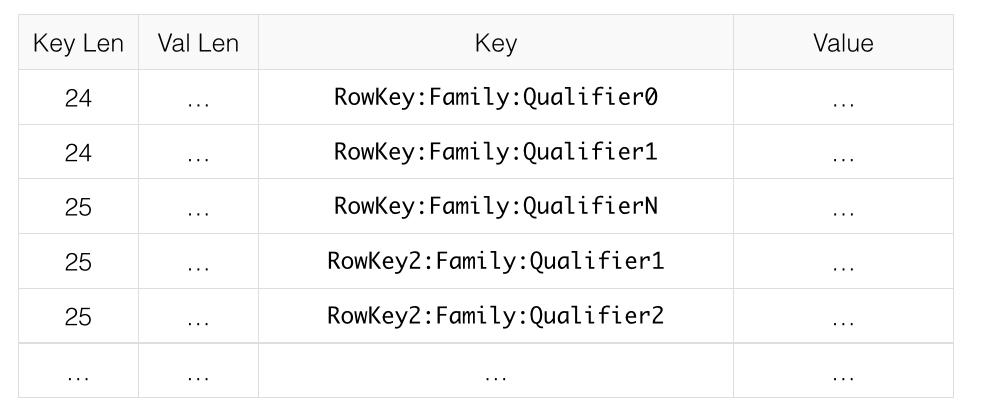
Often, keys are very similar. Specifically, keys often share a common prefix and only differ near the end. For instance, one key might be RowKey:Family:Qualifier0 and the next key might be RowKey:Family:Qualifier1.
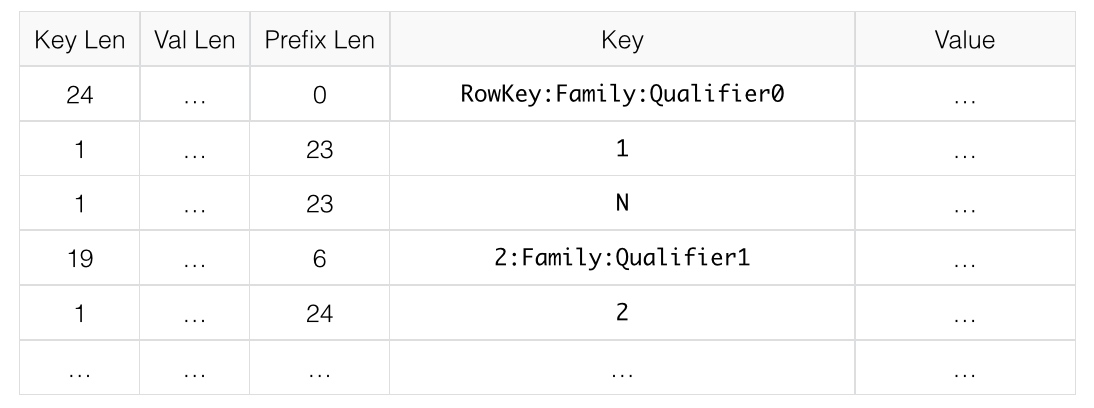
In Prefix encoding, an extra column is added which holds the length of the prefix shared between the current key and the previous key. Assuming the first key here is totally different from the key before, its prefix length is 0.
The second key's prefix length is 23, since they have the first 23 characters in common.
Obviously if the keys tend to have nothing in common, Prefix will not provide much benefit.
The following image shows a hypothetical ColumnFamily with no data block encoding.
Here is the same data with prefix data encoding.
Diff
Diff encoding expands upon Prefix encoding. Instead of considering the key sequentially as a monolithic series of bytes, each key field is split so that each part of the key can be compressed more efficiently.
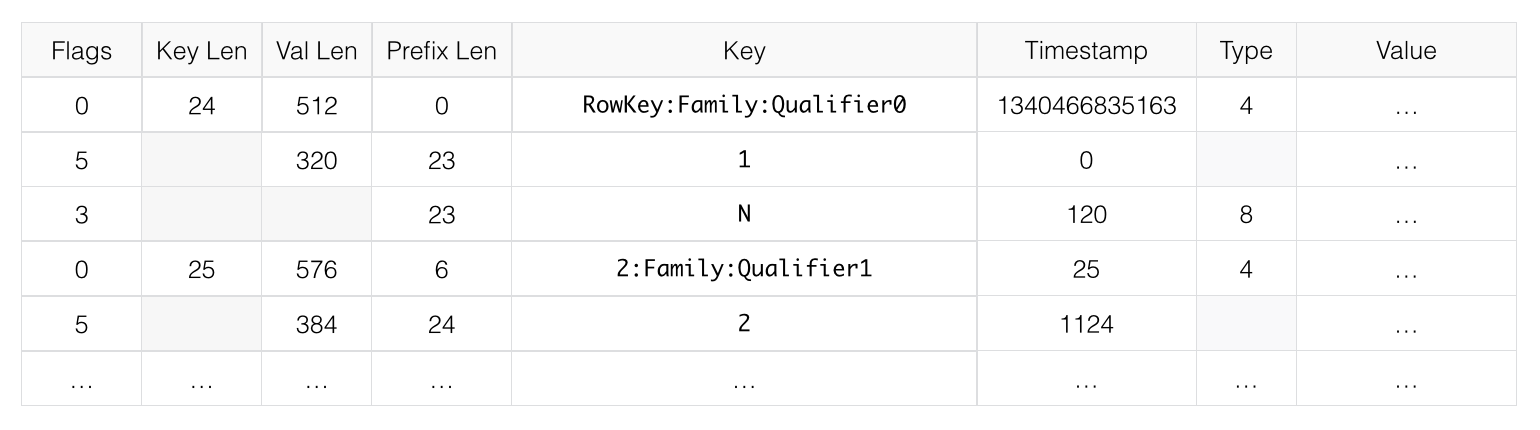
Two new fields are added: timestamp and type.
If the ColumnFamily is the same as the previous row, it is omitted from the current row.
If the key length, value length or type are the same as the previous row, the field is omitted.
In addition, for increased compression, the timestamp is stored as a Diff from the previous row's timestamp, rather than being stored in full. Given the two row keys in the Prefix example, and given an exact match on timestamp and the same type, neither the value length, or type needs to be stored for the second row, and the timestamp value for the second row is just 0, rather than a full timestamp.
Diff encoding is disabled by default because writing and scanning are slower but more data is cached.
This image shows the same ColumnFamily from the previous images, with Diff encoding.
Fast Diff
Fast Diff works similar to Diff, but uses a faster implementation. It also adds another field which stores a single bit to track whether the data itself is the same as the previous row. If it is, the data is not stored again.
Fast Diff is the recommended codec to use if you have long keys or many columns.
The data format is nearly identical to Diff encoding, so there is not an image to illustrate it.
Prefix Tree
Prefix tree encoding was introduced as an experimental feature in HBase 0.96. It provides similar memory savings to the Prefix, Diff, and Fast Diff encoder, but provides faster random access at a cost of slower encoding speed. It was removed in hbase-2.0.0. It was a good idea but little uptake. If interested in reviving this effort, write the hbase dev list.
Which Compressor or Data Block Encoder To Use
The compression or codec type to use depends on the characteristics of your data. Choosing the wrong type could cause your data to take more space rather than less, and can have performance implications.
In general, you need to weigh your options between smaller size and faster compression/decompression. Following are some general guidelines, expanded from a discussion at Documenting Guidance on compression and codecs.
- In most cases, enabling LZ4 or Snappy by default is a good choice, because they have a low performance overhead and provide reasonable space savings. A fast compression algorithm almost always improves overall system performance by trading some increased CPU usage for better I/O efficiency.
- If the values are large (and not pre-compressed, such as images), use a data block compressor.
- For cold data, which is accessed infrequently, depending on your use case, it might make sense to opt for Zstandard at its higher compression levels, or LZMA, especially for high entropy binary data, or Brotli for data similar in characteristics to web data. Bzip2 might also be a reasonable option but Zstandard is very likely to offer superior decompression speed.
- For hot data, which is accessed frequently, you almost certainly want only LZ4, Snappy, LZO, or Zstandard at a low compression level. These options will not provide as high of a compression ratio but will in trade not unduly impact system performance.
- If you have long keys (compared to the values) or many columns, use a prefix encoder. FAST_DIFF is recommended.
- If enabling WAL value compression, consider LZ4 or SNAPPY compression, or Zstandard at level 1. Reading and writing the WAL is performance critical. That said, the I/O savings of these compression options can improve overall system performance.
Making use of Hadoop Native Libraries in HBase
The Hadoop shared library has a bunch of facility including compression libraries and fast crc'ing — hardware crc'ing if your chipset supports it. To make this facility available to HBase, do the following. HBase/Hadoop will fall back to use alternatives if it cannot find the native library versions — or fail outright if you asking for an explicit compressor and there is no alternative available.
First make sure of your Hadoop. Fix this message if you are seeing it starting Hadoop processes:
16/02/09 22:40:24 WARN util.NativeCodeLoader: Unable to load native-hadoop library for your platform... using builtin-java classes where applicableIt means is not properly pointing at its native libraries or the native libs were compiled for another platform. Fix this first.
Then if you see the following in your HBase logs, you know that HBase was unable to locate the Hadoop native libraries:
2014-08-07 09:26:20,139 WARN [main] util.NativeCodeLoader: Unable to load native-hadoop library for your platform... using builtin-java classes where applicableIf the libraries loaded successfully, the WARN message does not show. Usually this means you are good to go but read on.
Let's presume your Hadoop shipped with a native library that suits the platform you are running HBase on. To check if the Hadoop native library is available to HBase, run the following tool (available in Hadoop 2.1 and greater):
$ ./bin/hbase --config ~/conf_hbase org.apache.hadoop.util.NativeLibraryChecker
2014-08-26 13:15:38,717 WARN  [main] util.NativeCodeLoader: Unable to load native-hadoop library for your platform... using builtin-java classes where applicable
Native library checking:
hadoop: false
zlib:   false
snappy: false
lz4:    false
bzip2:  false
2014-08-26 13:15:38,863 INFO  [main] util.ExitUtil: Exiting with status 1
Above shows that the native hadoop library is not available in HBase context.
The above NativeLibraryChecker tool may come back saying all is hunky-dory — i.e. all libs show 'true', that they are available — but follow the below presecription anyways to ensure the native libs are available in HBase context, when it goes to use them.
To fix the above, either copy the Hadoop native libraries local or symlink to them if the Hadoop and HBase stalls are adjacent in the filesystem.
You could also point at their location by setting the LD_LIBRARY_PATH environment variable in your hbase-env.sh.
Where the JVM looks to find native libraries is "system dependent" (See java.lang.System#loadLibrary(name)). On linux, by default, is going to look in lib/native/PLATFORM where PLATFORM is the label for the platform your HBase is installed on.
On a local linux machine, it seems to be the concatenation of the java properties os.name and os.arch followed by whether 32 or 64 bit.
HBase on startup prints out all of the java system properties so find the os.name and os.arch in the log.
For example:
...
2014-08-06 15:27:22,853 INFO  [main] zookeeper.ZooKeeper: Client environment:os.name=Linux
2014-08-06 15:27:22,853 INFO  [main] zookeeper.ZooKeeper: Client environment:os.arch=amd64
...
So in this case, the PLATFORM string is Linux-amd64-64.
Copying the Hadoop native libraries or symlinking at lib/native/Linux-amd64-64 will ensure they are found.
Rolling restart after you have made this change.
Here is an example of how you would set up the symlinks. Let the hadoop and hbase installs be in your home directory. Assume your hadoop native libs are at ~/hadoop/lib/native. Assume you are on a Linux-amd64-64 platform. In this case, you would do the following to link the hadoop native lib so hbase could find them.
...
$ mkdir -p ~/hbaseLinux-amd64-64 -> /home/stack/hadoop/lib/native/lib/native/
$ cd ~/hbase/lib/native/
$ ln -s ~/hadoop/lib/native Linux-amd64-64
$ ls -la
# Linux-amd64-64 -> /home/USER/hadoop/lib/native
...
If you see PureJavaCrc32C in a stack track or if you see something like the below in a perf trace, then native is not working; you are using the java CRC functions rather than native:
5.02% perf-53601.map [.] Lorg/apache/hadoop/util/PureJavaCrc32C;.updateSee HBASE-11927 Use Native Hadoop Library for HFile checksum (And flip default from CRC32 to CRC32C), for more on native checksumming support. See in particular the release note for how to check if your hardware to see if your processor has support for hardware CRCs. Or checkout the Apache Checksums in HBase blog post.
Here is example of how to point at the Hadoop libs with LD_LIBRARY_PATH environment variable:
$ LD_LIBRARY_PATH=~/hadoop-2.5.0-SNAPSHOT/lib/native ./bin/hbase --config ~/conf_hbase org.apache.hadoop.util.NativeLibraryChecker
2014-08-26 13:42:49,332 INFO  [main] bzip2.Bzip2Factory: Successfully loaded & initialized native-bzip2 library system-native
2014-08-26 13:42:49,337 INFO  [main] zlib.ZlibFactory: Successfully loaded & initialized native-zlib library
Native library checking:
hadoop: true /home/stack/hadoop-2.5.0-SNAPSHOT/lib/native/libhadoop.so.1.0.0
zlib:   true /lib64/libz.so.1
snappy: true /usr/lib64/libsnappy.so.1
lz4:    true revision:99
bzip2:  true /lib64/libbz2.so.1
Set in hbase-env.sh the LD_LIBRARY_PATH environment variable when starting your HBase.
Compressor Configuration, Installation, and Use
Configure HBase For Compressors
Compression codecs are provided either by HBase compressor modules or by Hadoop's native compression support. As described above you choose a compression type in table or column family schema or in site configuration using its short label, e.g. snappy for Snappy, or zstd for ZStandard. Which codec implementation is dynamically loaded to support what label is configurable by way of site configuration.
| Algorithm label | Codec implementation configuration key | Default value |
|---|---|---|
| BROTLI | hbase.io.compress.brotli.codec | org.apache.hadoop.hbase.io.compress.brotli.BrotliCodec |
| BZIP2 | hbase.io.compress.bzip2.codec | org.apache.hadoop.io.compress.BZip2Codec |
| GZ | hbase.io.compress.gz.codec | org.apache.hadoop.hbase.io.compress.ReusableStreamGzipCodec |
| LZ4 | hbase.io.compress.lz4.codec | org.apache.hadoop.io.compress.Lz4Codec |
| LZMA | hbase.io.compress.lzma.codec | org.apache.hadoop.hbase.io.compress.xz.LzmaCodec |
| LZO | hbase.io.compress.lzo.codec | com.hadoop.compression.lzo.LzoCodec |
| SNAPPY | hbase.io.compress.snappy.codec | org.apache.hadoop.io.compress.SnappyCodec |
| ZSTD | hbase.io.compress.zstd.codec | org.apache.hadoop.io.compress.ZStandardCodec |
The available codec implementation options are:
| Label | Codec implementation class | Notes |
|---|---|---|
| BROTLI | org.apache.hadoop.hbase.io.compress.brotli.BrotliCodec | Implemented with Brotli4j |
| BZIP2 | org.apache.hadoop.io.compress.BZip2Codec | Hadoop native codec |
| GZ | org.apache.hadoop.hbase.io.compress.ReusableStreamGzipCodec | Requires the Hadoop native GZ codec |
| LZ4 | org.apache.hadoop.io.compress.Lz4Codec | Hadoop native codec |
| LZ4 | org.apache.hadoop.hbase.io.compress.aircompressor.Lz4Codec | Pure Java implementation |
| LZ4 | org.apache.hadoop.hbase.io.compress.lz4.Lz4Codec | Implemented with lz4-java |
| LZMA | org.apache.hadoop.hbase.io.compress.xz.LzmaCodec | Implemented with XZ For Java |
| LZO | com.hadoop.compression.lzo.LzoCodec | Hadoop native codec, requires GPL licensed native dependencies |
| LZO | org.apache.hadoop.io.compress.LzoCodec | Hadoop native codec, requires GPL licensed native dependencies |
| LZO | org.apache.hadoop.hbase.io.compress.aircompressor.LzoCodec | Pure Java implementation |
| SNAPPY | org.apache.hadoop.io.compress.SnappyCodec | Hadoop native codec |
| SNAPPY | org.apache.hadoop.hbase.io.compress.aircompressor.SnappyCodec | Pure Java implementation |
| SNAPPY | org.apache.hadoop.hbase.io.compress.xerial.SnappyCodec | Implemented with snappy-java |
| ZSTD | org.apache.hadoop.io.compress.ZStandardCodec | Hadoop native codec |
| ZSTD | org.apache.hadoop.hbase.io.compress.aircompressor.ZstdCodec | Pure Java implementation, limited to a fixed compression level, not data compatible with the Hadoop zstd codec |
| ZSTD | org.apache.hadoop.hbase.io.compress.zstd.ZstdCodec | Implemented with zstd-jni, supports all compression levels, supports custom dictionaries |
Specify which codec implementation option you prefer for a given compression algorithm in site configuration, like so:
...
<property>
  <name>hbase.io.compress.lz4.codec</name>
  <value>org.apache.hadoop.hbase.io.compress.lz4.Lz4Codec</value>
</property>
...
Compressor Microbenchmarks
See https://github.com/apurtell/jmh-compression-tests
256MB (258,126,022 bytes exactly) of block data was extracted from two HFiles containing Common Crawl data ingested using IntegrationLoadTestCommonCrawl, 2,680 blocks in total. This data was processed by each new codec implementation as if the block data were being compressed again for write into an HFile, but without writing any data, comparing only the CPU time and resource demand of the codec itself. Absolute performance numbers will vary depending on hardware and software particulars of your deployment. The relative differences are what are interesting. Measured time is the average time in milliseconds required to compress all blocks of the 256MB file. This is how long it would take to write the HFile containing these contents, minus the I/O overhead of block encoding and actual persistence.
These are the results:
| Codec | Level | Time (milliseconds) | Result (bytes) | Improvement |
|---|---|---|---|---|
| AirCompressor LZ4 | - | 349.989 ± 2.835 | 76,999,408 | 70.17% |
| AirCompressor LZO | - | 334.554 ± 3.243 | 79,369,805 | 69.25% |
| AirCompressor Snappy | - | 364.153 ± 19.718 | 80,201,763 | 68.93% |
| AirCompressor Zstandard | 3 (effective) | 1108.267 ± 8.969 | 55,129,189 | 78.64% |
| Brotli | 1 | 593.107 ± 2.376 | 58,672,319 | 77.27% |
| Brotli | 3 | 1345.195 ± 27.327 | 53,917,438 | 79.11% |
| Brotli | 6 | 2812.411 ± 25.372 | 48,696,441 | 81.13% |
| Brotli | 10 | 74615.936 ± 224.854 | 44,970,710 | 82.58% |
| LZ4 (lz4-java) | - | 303.045 ± 0.783 | 76,974,364 | 70.18% |
| LZMA | 1 | 6410.428 ± 115.065 | 49,948,535 | 80.65% |
| LZMA | 3 | 8144.620 ± 152.119 | 49,109,363 | 80.97% |
| LZMA | 6 | 43802.576 ± 382.025 | 46,951,810 | 81.81% |
| LZMA | 9 | 49821.979 ± 580.110 | 46,951,810 | 81.81% |
| Snappy (xerial) | - | 360.225 ± 2.324 | 80,749,937 | 68.72% |
| Zstd (zstd-jni) | 1 | 654.699 ± 16.839 | 56,719,994 | 78.03% |
| Zstd (zstd-jni) | 3 | 839.160 ± 24.906 | 54,573,095 | 78.86% |
| Zstd (zstd-jni) | 5 | 1594.373 ± 22.384 | 52,025,485 | 79.84% |
| Zstd (zstd-jni) | 7 | 2308.705 ± 24.744 | 50,651,554 | 80.38% |
| Zstd (zstd-jni) | 9 | 3659.677 ± 58.018 | 50,208,425 | 80.55% |
| Zstd (zstd-jni) | 12 | 8705.294 ± 58.080 | 49,841,446 | 80.69% |
| Zstd (zstd-jni) | 15 | 19785.646 ± 278.080 | 48,499,508 | 81.21% |
| Zstd (zstd-jni) | 18 | 47702.097 ± 442.670 | 48,319,879 | 81.28% |
| Zstd (zstd-jni) | 22 | 97799.695 ± 1106.571 | 48,212,220 | 81.32% |
Compressor Support On the Master
A new configuration setting was introduced in HBase 0.95, to check the Master to determine which data block encoders are installed and configured on it, and assume that the entire cluster is configured the same.
This option, hbase.master.check.compression, defaults to true.
This prevents the situation described in HBASE-6370, where a table is created or modified to support a codec that a region server does not support, leading to failures that take a long time to occur and are difficult to debug.
If hbase.master.check.compression is enabled, libraries for all desired compressors need to be installed and configured on the Master, even if the Master does not run a region server.
Install GZ Support Via Native Libraries
HBase uses Java's built-in GZip support unless the native Hadoop libraries are available on the CLASSPATH.
The recommended way to add libraries to the CLASSPATH is to set the environment variable HBASE_LIBRARY_PATH for the user running HBase.
If native libraries are not available and Java's GZIP is used, Got brand-new compressor reports will be present in the logs.
See brand.new.compressor).
Install Hadoop Native LZO Support
HBase cannot ship with the Hadoop native LZO codc because of incompatibility between HBase, which uses an Apache Software License (ASL) and LZO, which uses a GPL license. See the Hadoop-LZO at Twitter for information on configuring LZO support for HBase.
If you depend upon LZO compression, consider using the pure Java and ASL licensed AirCompressor LZO codec option instead of the Hadoop native default, or configure your RegionServers to fail to start if native LZO support is not available. See hbase.regionserver.codecs.
Configure Hadoop Native LZ4 Support
LZ4 support is bundled with Hadoop and is the default LZ4 codec implementation. It is not required that you make use of the Hadoop LZ4 codec. Our LZ4 codec implemented with lz4-java offers superior performance, and the AirCompressor LZ4 codec offers a pure Java option for use where native support is not available.
That said, if you prefer the Hadoop option, make sure the hadoop shared library (libhadoop.so) is accessible when you start HBase. After configuring your platform (see hadoop.native.lib), you can make a symbolic link from HBase to the native Hadoop libraries. This assumes the two software installs are colocated. For example, if my 'platform' is Linux-amd64-64:
$ cd $HBASE_HOME
$ mkdir lib/native
$ ln -s $HADOOP_HOME/lib/native lib/native/Linux-amd64-64
Use the compression tool to check that LZ4 is installed on all nodes. Start up (or restart) HBase. Afterward, you can create and alter tables to enable LZ4 as a compression codec.:
hbase(main):003:0> alter 'TestTable', {NAME => 'info', COMPRESSION => 'LZ4'}Install Hadoop native Snappy Support
Snappy support is bundled with Hadoop and is the default Snappy codec implementation. It is not required that you make use of the Hadoop Snappy codec. Our Snappy codec implemented with Xerial Snappy offers superior performance, and the AirCompressor Snappy codec offers a pure Java option for use where native support is not available.
That said, if you prefer the Hadoop codec option, you can install Snappy binaries (for instance, by using +yum install snappy+ on CentOS) or build Snappy from source. After installing Snappy, search for the shared library, which will be called libsnappy.so.X where X is a number. If you built from source, copy the shared library to a known location on your system, such as /opt/snappy/lib/.
In addition to the Snappy library, HBase also needs access to the Hadoop shared library, which will be called something like libhadoop.so.X.Y, where X and Y are both numbers. Make note of the location of the Hadoop library, or copy it to the same location as the Snappy library.
The Snappy and Hadoop libraries need to be available on each node of your cluster. See compression.test to find out how to test that this is the case.
See hbase.regionserver.codecs to configure your RegionServers to fail to start if a given compressor is not available.
Each of these library locations need to be added to the environment variable HBASE_LIBRARY_PATH for the operating system user that runs HBase.
You need to restart the RegionServer for the changes to take effect.
CompressionTest
You can use the CompressionTest tool to verify that your compressor is available to HBase:
$ hbase org.apache.hadoop.hbase.util.CompressionTest hdfs://host/path/to/hbase snappyEnforce Compression Settings On a RegionServer
You can configure a RegionServer so that it will fail to restart if compression is configured incorrectly, by adding the option hbase.regionserver.codecs to the hbase-site.xml, and setting its value to a comma-separated list of codecs that need to be available.
For example, if you set this property to lzo,gz, the RegionServer would fail to start if both compressors were not available.
This would prevent a new server from being added to the cluster without having codecs configured properly.
Enable Compression On a ColumnFamily
To enable compression for a ColumnFamily, use an alter command.
You do not need to re-create the table or copy data.
If you are changing codecs, be sure the old codec is still available until all the old StoreFiles have been compacted.
Enabling Compression on a ColumnFamily of an Existing Table using HBaseShell
hbase> alter 'test', {NAME => 'cf', COMPRESSION => 'GZ'}Creating a New Table with Compression On a ColumnFamily
hbase> create 'test2', { NAME => 'cf2', COMPRESSION => 'SNAPPY' }Verifying a ColumnFamily's Compression Settings
hbase> describe 'test'
DESCRIPTION                                          ENABLED
 'test', {NAME => 'cf', DATA_BLOCK_ENCODING => 'NONE false
 ', BLOOMFILTER => 'ROW', REPLICATION_SCOPE => '0',
 VERSIONS => '1', COMPRESSION => 'GZ', MIN_VERSIONS
 => '0', TTL => 'FOREVER', KEEP_DELETED_CELLS => 'fa
 lse', BLOCKSIZE => '65536', IN_MEMORY => 'false', B
 LOCKCACHE => 'true'}
1 row(s) in 0.1070 seconds
Testing Compression Performance
HBase includes a tool called LoadTestTool which provides mechanisms to test your compression performance.
You must specify either -write or -update-read as your first parameter, and if you do not specify another parameter, usage advice is printed for each option.
LoadTestTool Usage
$ bin/hbase org.apache.hadoop.hbase.util.LoadTestTool -h
usage: bin/hbase org.apache.hadoop.hbase.util.LoadTestTool <options>
Options:
 -batchupdate                 Whether to use batch as opposed to separate
                              updates for every column in a row
 -bloom <arg>                 Bloom filter type, one of [NONE, ROW, ROWCOL]
 -compression <arg>           Compression type, one of [LZO, GZ, NONE, SNAPPY,
                              LZ4]
 -data_block_encoding <arg>   Encoding algorithm (e.g. prefix compression) to
                              use for data blocks in the test column family, one
                              of [NONE, PREFIX, DIFF, FAST_DIFF, ROW_INDEX_V1].
 -encryption <arg>            Enables transparent encryption on the test table,
                              one of [AES]
 -generator <arg>             The class which generates load for the tool. Any
                              args for this class can be passed as colon
                              separated after class name
 -h,--help                    Show usage
 -in_memory                   Tries to keep the HFiles of the CF inmemory as far
                              as possible.  Not guaranteed that reads are always
                              served from inmemory
 -init_only                   Initialize the test table only, don't do any
                              loading
 -key_window <arg>            The 'key window' to maintain between reads and
                              writes for concurrent write/read workload. The
                              default is 0.
 -max_read_errors <arg>       The maximum number of read errors to tolerate
                              before terminating all reader threads. The default
                              is 10.
 -multiput                    Whether to use multi-puts as opposed to separate
                              puts for every column in a row
 -num_keys <arg>              The number of keys to read/write
 -num_tables <arg>            A positive integer number. When a number n is
                              speicfied, load test tool  will load n table
                              parallely. -tn parameter value becomes table name
                              prefix. Each table name is in format
                              <tn>_1...<tn>_n
 -read <arg>                  <verify_percent>[:#threads=20]
 -regions_per_server <arg>    A positive integer number. When a number n is
                              specified, load test tool will create the test
                              table with n regions per server
 -skip_init                   Skip the initialization; assume test table already
                              exists
 -start_key <arg>             The first key to read/write (a 0-based index). The
                              default value is 0.
 -tn <arg>                    The name of the table to read or write
 -update <arg>                <update_percent>[:#threads=20][:#whether to
                              ignore nonce collisions=0]
 -write <arg>                 <avg_cols_per_key>:<avg_data_size>[:#threads=20]
 -zk <arg>                    ZK quorum as comma-separated host names without
                              port numbers
 -zk_root <arg>               name of parent znode in zookeeper
Example Usage of LoadTestTool
$ hbase org.apache.hadoop.hbase.util.LoadTestTool -write 1:10:100 -num_keys 1000000 \
      -read 100:30 -num_tables 1 -data_block_encoding NONE -tn load_test_tool_NONE
Enable Data Block Encoding
Codecs are built into HBase so no extra configuration is needed.
Codecs are enabled on a table by setting the DATA_BLOCK_ENCODING property.
Disable the table before altering its DATA_BLOCK_ENCODING setting.
Following is an example using HBase Shell:
Enable Data Block Encoding On a Table
hbase> alter 'test', { NAME => 'cf', DATA_BLOCK_ENCODING => 'FAST_DIFF' }
Updating all regions with the new schema...
0/1 regions updated.
1/1 regions updated.
Done.
0 row(s) in 2.2820 seconds
Verifying a ColumnFamily's Data Block Encoding
hbase> describe 'test'
DESCRIPTION                                          ENABLED
 'test', {NAME => 'cf', DATA_BLOCK_ENCODING => 'FAST true
 _DIFF', BLOOMFILTER => 'ROW', REPLICATION_SCOPE =>
 '0', VERSIONS => '1', COMPRESSION => 'GZ', MIN_VERS
 IONS => '0', TTL => 'FOREVER', KEEP_DELETED_CELLS =
 > 'false', BLOCKSIZE => '65536', IN_MEMORY => 'fals
 e', BLOCKCACHE => 'true'}
1 row(s) in 0.0650 seconds