Cluster Replication
Setting up and managing HBase cluster replication for disaster recovery, data aggregation, and geographic distribution of data.
Cluster Replication
HBase provides a cluster replication mechanism which allows you to keep one cluster's state synchronized with that of another cluster, using the write-ahead log (WAL) of the source cluster to propagate the changes. Some use cases for cluster replication include:
- Backup and disaster recovery
- Data aggregation
- Geographic data distribution
- Online data ingestion combined with offline data analytics
Replication is enabled at the granularity of the column family. Before enabling replication for a column family, create the table and all column families to be replicated, on the destination cluster.
Replication is asynchronous as we send WAL to another cluster in background, which means that when you want to do recovery through replication, you could loss some data. To address this problem, we have introduced a new feature called synchronous replication. As the mechanism is a bit different so we use a separated section to describe it. Please see Synchronous Replication.
At present, there is compatibility problem if Replication and WAL Compression are used together.
If you need to use Replication, it is recommended to set the
hbase.regionserver.wal.enablecompression property to false. See
(HBASE-26849) for details.
Replication Overview
Cluster replication uses a source-push methodology. An HBase cluster can be a source (also called master or active, meaning that it is the originator of new data), a destination (also called slave or passive, meaning that it receives data via replication), or can fulfill both roles at once. Replication is asynchronous, and the goal of replication is eventual consistency. When the source receives an edit to a column family with replication enabled, that edit is propagated to all destination clusters using the WAL for that for that column family on the RegionServer managing the relevant region.
When data is replicated from one cluster to another, the original source of the data is tracked via a cluster ID which is part of the metadata. In HBase 0.96 and newer (HBASE-7709), all clusters which have already consumed the data are also tracked. This prevents replication loops.
The WALs for each region server must be kept in HDFS as long as they are needed to replicate data to any slave cluster. Each region server reads from the oldest log it needs to replicate and keeps track of its progress processing WALs inside ZooKeeper to simplify failure recovery. The position marker which indicates a slave cluster's progress, as well as the queue of WALs to process, may be different for every slave cluster.
The clusters participating in replication can be of different sizes. The master cluster relies on randomization to attempt to balance the stream of replication on the slave clusters. It is expected that the slave cluster has storage capacity to hold the replicated data, as well as any data it is responsible for ingesting. If a slave cluster does run out of room, or is inaccessible for other reasons, it throws an error and the master retains the WAL and retries the replication at intervals.
Consistency Across Replicated Clusters
How your application builds on top of the HBase API matters when replication is in play. HBase's replication system provides at-least-once delivery of client edits for an enabled column family to each configured destination cluster. In the event of failure to reach a given destination, the replication system will retry sending edits in a way that might repeat a given message. HBase provides two ways of replication, one is the original replication and the other is serial replication. In the previous way of replication, there is not a guaranteed order of delivery for client edits. In the event of a RegionServer failing, recovery of the replication queue happens independent of recovery of the individual regions that server was previously handling. This means that it is possible for the not-yet-replicated edits to be serviced by a RegionServer that is currently slower to replicate than the one that handles edits from after the failure.
The combination of these two properties (at-least-once delivery and the lack of message ordering) means that some destination clusters may end up in a different state if your application makes use of operations that are not idempotent, e.g. Increments.
To solve the problem, HBase now supports serial replication, which sends edits to destination cluster as the order of requests from client. See Serial Replication.
Terminology Changes
Previously, terms such as master-master, master-slave, and cyclical were used to describe replication relationships in HBase. These terms added confusion, and have been abandoned in favor of discussions about cluster topologies appropriate for different scenarios.
Cluster Topologies
- A central source cluster might propagate changes out to multiple destination clusters, for failover or due to geographic distribution.
- A source cluster might push changes to a destination cluster, which might also push its own changes back to the original cluster.
- Many different low-latency clusters might push changes to one centralized cluster for backup or resource-intensive data analytics jobs. The processed data might then be replicated back to the low-latency clusters.
Multiple levels of replication may be chained together to suit your organization's needs. The following diagram shows a hypothetical scenario. Use the arrows to follow the data paths.
Example of a Complex Cluster Replication Configuration
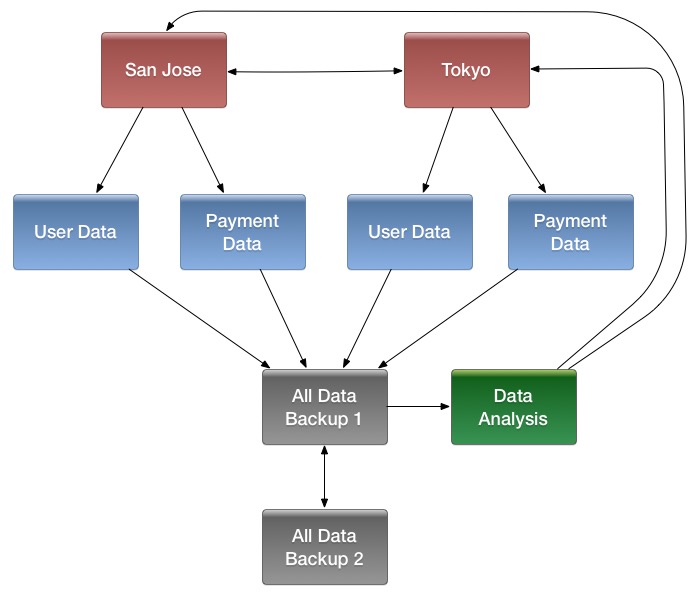
HBase replication borrows many concepts from the statement-based replication design used by MySQL. Instead of SQL statements, entire WALEdits (consisting of multiple cell inserts coming from Put and Delete operations on the clients) are replicated in order to maintain atomicity.
Managing and Configuring Cluster Replication
Cluster Configuration Overview
- Configure and start the source and destination clusters. Create tables with the same names and column families on both the source and destination clusters, so that the destination cluster knows where to store data it will receive.
- All hosts in the source and destination clusters should be reachable to each other.
- If both clusters use the same ZooKeeper cluster, you must use a different
zookeeper.znode.parent, because they cannot write in the same folder. - On the source cluster, in HBase Shell, add the destination cluster as a peer, using the
add_peercommand. - On the source cluster, in HBase Shell, enable the table replication, using the
enable_table_replicationcommand. - Check the logs to see if replication is taking place. If so, you will see messages like the following, coming from the ReplicationSource.
LOG.info("Replicating "+clusterId + " -> " + peerClusterId);Serial Replication Configuration
Cluster Management Commands
add_peer <ID> <CLUSTER_KEY>
Adds a replication relationship between two clusters.
- ID — a unique string, which must not contain a hyphen.
- CLUSTER_KEY: composed using the following template, with appropriate place-holders:
hbase.zookeeper.quorum:hbase.zookeeper.property.clientPort:zookeeper.znode.parent. This value can be found on the Master UI info page. - STATE(optional): ENABLED or DISABLED, default value is ENABLED
list_peers
list all replication relationships known by this cluster
enable_peer <ID>
Enable a previously-disabled replication relationship
disable_peer <ID>
Disable a replication relationship. HBase will no longer send edits to that peer cluster, but it still keeps track of all the new WALs that it will need to replicate if and when it is re-enabled. WALs are retained when enabling or disabling replication as long as peers exist.
remove_peer <ID>
Disable and remove a replication relationship. HBase will no longer send edits to that peer cluster or keep track of WALs.
enable_table_replication <TABLE_NAME>
Enable the table replication switch for all its column families. If the table is not found in the destination cluster then it will create one with the same name and column families.
disable_table_replication <TABLE_NAME>
Disable the table replication switch for all its column families.
peer_modification_switch <enable_or_disable>, <drain_procedures>
Enabled/Disable peer modification operations, such as adding/removing replication peers. The second parameter means whether you want to wait until all existing peer modification procedures to finish before returning when disabling peer modification.
peer_modification_enabled
Check whether peer modification is enabled.
Migrate Across Different Replication Peer Storages
Starting from 2.6.0, we introduce a file system based ReplicationPeerStorage, which stores the replication peer state with files on HFile file system, instead of znodes on ZooKeeper. And we have also implemented a tool to copy replication peer state across different replication peer storages.
./bin/hbase copyreppeers <SRC_REPLICATION_PEER_STORAGE> <DST_REPLICATION_PEER_STORAGE>To support doing the migrate online, we introduce a shell command called peer_modification_switch.
hbase> peer_modification_switch false, trueUse the above command can disable peer modification operations. The second true means you want to wait until all the existing replication peer modification procedures to finish before returning. After disabling the peer modification, it is safe for you to copy replication peer state with the above tool, and then update all the hbase-site.xml files in the cluster to specify the new replication peer storage, and finally trigger an online configuration update to load the new replication peer storage.
Serial Replication
Note: this feature is introduced in HBase 2.1
Function of serial replication
Serial replication supports to push logs to the destination cluster in the same order as logs reach to the source cluster.
Why need serial replication?
In replication of HBase, we push mutations to destination cluster by reading WAL in each region server. We have a queue for WAL files so we can read them in order of creation time. However, when region-move or RS failure occurs in source cluster, the hlog entries that are not pushed before region-move or RS-failure will be pushed by original RS(for region move) or another RS which takes over the remained hlog of dead RS(for RS failure), and the new entries for the same region(s) will be pushed by the RS which now serves the region(s), but they push the hlog entries of a same region concurrently without coordination.
This treatment can possibly lead to data inconsistency between source and destination clusters:
- there are put and then delete written to source cluster.
- due to region-move / RS-failure, they are pushed by different replication-source threads to peer cluster.
- if delete is pushed to peer cluster before put, and flush and major-compact occurs in peer cluster before put is pushed to peer cluster, the delete is collected and the put remains in peer cluster, but in source cluster the put is masked by the delete, hence data inconsistency between source and destination clusters.
Serial replication configuration
Set the serial flag to true for a repliation peer. And the default serial flag is false.
-
Add a new replication peer which serial flag is true
hbase> add_peer '1', CLUSTER_KEY => "server1.cie.com:2181:/hbase", SERIAL => true -
Set a replication peer's serial flag to false
hbase> set_peer_serial '1', false -
Set a replication peer's serial flag to true
hbase> set_peer_serial '1', true
The serial replication feature had been done firstly in HBASE-9465 and then reverted and redone in HBASE-20046. You can find more details in these issues.
Verifying Replicated Data
The VerifyReplication MapReduce job, which is included in HBase, performs a systematic comparison of replicated data between two different clusters. Run the VerifyReplication job on the master cluster, supplying it with the peer ID and table name to use for validation. You can limit the verification further by specifying a time range or specific families. The job's short name is verifyrep. To run the job, use a command like the following:
$ HADOOP_CLASSPATH=`${HBASE_HOME}/bin/hbase classpath` "${HADOOP_HOME}/bin/hadoop" jar "${HBASE_HOME}/hbase-mapreduce-VERSION.jar" verifyrep --starttime=<timestamp> --endtime=<timestamp> --families=<myFam> <ID> <tableName>- The
VerifyReplicationcommand prints outGOODROWSandBADROWScounters to indicate rows that did and did not replicate correctly.
Detailed Information About Cluster Replication
Replication Architecture Overview
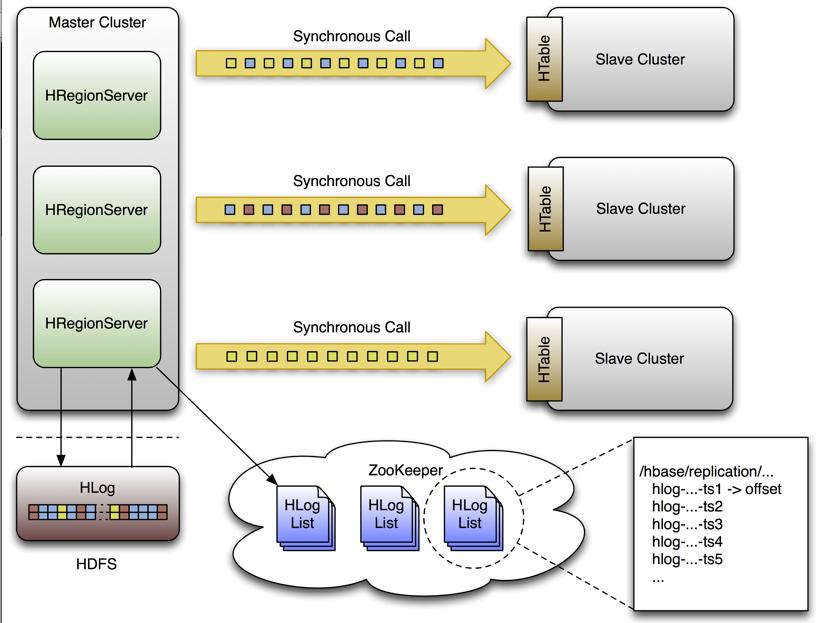
Life of a WAL Edit
A single WAL edit goes through several steps in order to be replicated to a slave cluster.
- An HBase client uses a Put or Delete operation to manipulate data in HBase.
- The region server writes the request to the WAL in a way allows it to be replayed if it is not written successfully.
- If the changed cell corresponds to a column family that is scoped for replication, the edit is added to the queue for replication.
- In a separate thread, the edit is read from the log, as part of a batch process. Only the KeyValues that are eligible for replication are kept. Replicable KeyValues are part of a column family whose schema is scoped GLOBAL, are not part of a catalog such as
hbase:meta, did not originate from the target slave cluster, and have not already been consumed by the target slave cluster. - The edit is tagged with the master's UUID and added to a buffer. When the buffer is filled, or the reader reaches the end of the file, the buffer is sent to a random region server on the slave cluster.
- The region server reads the edits sequentially and separates them into buffers, one buffer per table. After all edits are read, each buffer is flushed using Table, HBase's normal client. The master's UUID and the UUIDs of slaves which have already consumed the data are preserved in the edits they are applied, in order to prevent replication loops.
- In the master, the offset for the WAL that is currently being replicated is registered in ZooKeeper.
- The first three steps, where the edit is inserted, are identical.
- Again in a separate thread, the region server reads, filters, and edits the log edits in the same way as above. The slave region server does not answer the RPC call.
- The master sleeps and tries again a configurable number of times.
- If the slave region server is still not available, the master selects a new subset of region server to replicate to, and tries again to send the buffer of edits.
- Meanwhile, the WALs are rolled and stored in a queue in ZooKeeper. Logs that are archived by their region server, by moving them from the region server's log directory to a central log directory, will update their paths in the in-memory queue of the replicating thread.
- When the slave cluster is finally available, the buffer is applied in the same way as during normal processing. The master region server will then replicate the backlog of logs that accumulated during the outage.
Spreading Queue Failover Load
When replication is active, a subset of region servers in the source cluster is responsible for shipping edits to the sink. This responsibility must be failed over like all other region server functions should a process or node crash. The following configuration settings are recommended for maintaining an even distribution of replication activity over the remaining live servers in the source cluster:
- Set
replication.source.maxretriesmultiplierto300. - Set
replication.source.sleepforretriesto1(1 second). This value, combined with the value ofreplication.source.maxretriesmultiplier, causes the retry cycle to last about 5 minutes. - Set
replication.sleep.before.failoverto30000(30 seconds) in the source cluster site configuration.
Preserving Tags During Replication
By default, the codec used for replication between clusters strips tags, such as cell-level ACLs, from cells. To prevent the tags from being stripped, you can use a different codec which does not strip them. Configure hbase.replication.rpc.codec to use org.apache.hadoop.hbase.codec.KeyValueCodecWithTags, on both the source and sink RegionServers involved in the replication. This option was introduced in HBASE-10322.
Replication Internals
Replication State Storage
In HBASE-15867, we abstract two interfaces for storing replication state, ReplicationPeerStorage and ReplicationQueueStorage. The former one is for storing the replication peer related states, and the latter one is for storing the replication queue related states. HBASE-15867 is only half done, as although we have abstract these two interfaces, we still only have zookeeper based implementations.
And in HBASE-27110, we have implemented a file system based replication peer storage, to store replication peer state on file system. Of course you can still use the zookeeper based replication peer storage.
And in HBASE-27109, we have changed the replication queue storage from zookeeper based to hbase table based. See the below Replication Queue State in hbase:replication table section for more details.
Replication State in ZooKeeper
By default, the state is contained in the base node /hbase/replication. Usually this nodes contains two child nodes, the peers znode is for storing replication peer state, and the rs znodes is for storing replication queue state. And if you choose the file system based replication peer storage, you will not see the peers znode. And starting from 3.0.0, we have moved the replication queue state to hbase:replication table (see below), so you will not see the rs znode.
The Peers Znode
The peers znode is stored in /hbase/replication/peers by default. It consists of a list of all peer replication clusters, along with the status of each of them. The value of each peer is its cluster key, which is provided in the HBase Shell. The cluster key contains a list of ZooKeeper nodes in the cluster's quorum, the client port for the ZooKeeper quorum, and the base znode for HBase in HDFS on that cluster. Starting from 3.0.0, you can also specify connection URI as a cluster key. See Connection URI for more details about connection URI.
The RS Znode
The rs znode contains a list of WAL logs which need to be replicated. This list is divided into a set of queues organized by region server and the peer cluster the region server is shipping the logs to. The rs znode has one child znode for each region server in the cluster. The child znode name is the region server's hostname, client port, and start code. This list includes both live and dead region servers.
The hbase:replication Table
After 3.0.0, the Queue has been stored in the hbase:replication table, where the row key is <PeerId>-<ServerName>[/<SourceServerName>], the WAL group will be the qualifier, and the serialized ReplicationGroupOffset will be the value. The ReplicationGroupOffset includes the wal file of the corresponding queue (<PeerId>-<ServerName>[/<SourceServerName>]) and its offset. Because we track replication offset per queue instead of per file, we only need to store one replication offset per queue.
Other implementations for ReplicationPeerStorage
Starting from 2.6.0, we introduce a file system based ReplicationPeerStorage, which stores the replication peer state with files on HFile file system, instead of znodes on ZooKeeper. The layout is almost the same with znodes on zookeeper, the main difference is that, the HFile file system may not support atomic rename, so we use two files to store the state and when reading we will read them both and compare the timestamp to find out the newer one. So typically, you will see two peer config files. And for enable/disable state, we just touch a disabled file if the peer is disabled, and remove the file when enabling the peer.
Choosing Region Servers to Replicate To
When a master cluster region server initiates a replication source to a slave cluster, it first connects to the slave's ZooKeeper ensemble using the provided cluster key . It then scans the rs/ directory to discover all the available sinks (region servers that are accepting incoming streams of edits to replicate) and randomly chooses a subset of them using a configured ratio which has a default value of 10%. For example, if a slave cluster has 150 machines, 15 will be chosen as potential recipient for edits that this master cluster region server sends. Because this selection is performed by each master region server, the probability that all slave region servers are used is very high, and this method works for clusters of any size. For example, a master cluster of 10 machines replicating to a slave cluster of 5 machines with a ratio of 10% causes the master cluster region servers to choose one machine each at random.
A ZooKeeper watcher is placed on the $zookeeper.znode.parent/rs node of the slave cluster by each of the master cluster's region servers. This watch is used to monitor changes in the composition of the slave cluster. When nodes are removed from the slave cluster, or if nodes go down or come back up, the master cluster's region servers will respond by selecting a new pool of slave region servers to replicate to.
Keeping Track of Logs(based on ZooKeeper)
Each master cluster region server has its own znode in the replication znodes hierarchy. It contains one znode per peer cluster (if 5 slave clusters, 5 znodes are created), and each of these contain a queue of WALs to process. Each of these queues will track the WALs created by that region server, but they can differ in size. For example, if one slave cluster becomes unavailable for some time, the WALs should not be deleted, so they need to stay in the queue while the others are processed. See rs.failover.details for an example.
When a source is instantiated, it contains the current WAL that the region server is writing to. During log rolling, the new file is added to the queue of each slave cluster's znode just before it is made available. This ensures that all the sources are aware that a new log exists before the region server is able to append edits into it, but this operations is now more expensive. The queue items are discarded when the replication thread cannot read more entries from a file (because it reached the end of the last block) and there are other files in the queue. This means that if a source is up to date and replicates from the log that the region server writes to, reading up to the "end" of the current file will not delete the item in the queue.
A log can be archived if it is no longer used or if the number of logs exceeds hbase.regionserver.maxlogs because the insertion rate is faster than regions are flushed. When a log is archived, the source threads are notified that the path for that log changed. If a particular source has already finished with an archived log, it will just ignore the message. If the log is in the queue, the path will be updated in memory. If the log is currently being replicated, the change will be done atomically so that the reader doesn't attempt to open the file when has already been moved. Because moving a file is a NameNode operation , if the reader is currently reading the log, it won't generate any exception.
Keeping Track of Logs(based on hbase table)
After 3.0.0, for table based implementation, we have server name in row key, which means we will have lots of rows for a given peer.
For a normal replication queue, the WAL files belong to the region server that is still alive, all the WAL files are kept in memory, so we do not need to get the WAL files from replication queue storage. And for a recovered replication queue, we could get the WAL files of the dead region server by listing the old WAL directory on HDFS. So theoretically, we do not need to store every WAL file in replication queue storage. And what's more, we store the created time(usually) in the WAL file name, so for all the WAL files in a WAL group, we can sort them(actually we will sort them in the current replication framework), which means we only need to store one replication offset per queue. When starting a recovered replication queue, we will skip all the files before this offset, and start replicating from this offset.
For ReplicationLogCleaner, all the files before this offset can be deleted, otherwise not.
Reading, Filtering and Sending Edits
By default, a source attempts to read from a WAL and ship log entries to a sink as quickly as possible. Speed is limited by the filtering of log entries Only KeyValues that are scoped GLOBAL and that do not belong to catalog tables will be retained. Speed is also limited by total size of the list of edits to replicate per slave, which is limited to 64 MB by default. With this configuration, a master cluster region server with three slaves would use at most 192 MB to store data to replicate. This does not account for the data which was filtered but not garbage collected.
Once the maximum size of edits has been buffered or the reader reaches the end of the WAL, the source thread stops reading and chooses at random a sink to replicate to (from the list that was generated by keeping only a subset of slave region servers). It directly issues a RPC to the chosen region server and waits for the method to return. If the RPC was successful, the source determines whether the current file has been emptied or it contains more data which needs to be read. If the file has been emptied, the source deletes the znode in the queue. Otherwise, it registers the new offset in the log's znode. If the RPC threw an exception, the source will retry 10 times before trying to find a different sink.
Cleaning Logs
If replication is not enabled, the master's log-cleaning thread deletes old logs using a configured TTL. This TTL-based method does not work well with replication, because archived logs which have exceeded their TTL may still be in a queue. The default behavior is augmented so that if a log is past its TTL, the cleaning thread looks up every queue until it finds the log, while caching queues it has found. If the log is not found in any queues, the log will be deleted. The next time the cleaning process needs to look for a log, it starts by using its cached list.
WALs are saved when replication is enabled or disabled as long as peers exist.
Region Server Failover
When no region servers are failing, keeping track of the logs in ZooKeeper adds no value. Unfortunately, region servers do fail, and since ZooKeeper is highly available, it is useful for managing the transfer of the queues in the event of a failure. Each of the master cluster region servers keeps a watcher on every other region server, in order to be notified when one dies (just as the master does). When a failure happens, they all race to create a znode called lock inside the dead region server's znode that contains its queues. The region server that creates it successfully then transfers all the queues to its own znode, one at a time since ZooKeeper does not support renaming queues. After queues are all transferred, they are deleted from the old location. The znodes that were recovered are renamed with the ID of the slave cluster appended with the name of the dead server.
Next, the master cluster region server creates one new source thread per copied queue, and each of the source threads follows the read/filter/ship pattern. The main difference is that those queues will never receive new data, since they do not belong to their new region server. When the reader hits the end of the last log, the queue's znode is deleted and the master cluster region server closes that replication source.
And starting from 2.5.0, the failover logic has been moved to SCP, where we add a SERVER_CRASH_CLAIM_REPLICATION_QUEUES step in SCP to claim the replication queues for a dead server. And starting from 3.0.0, where we changed the replication queue storage from zookeeper to table, the update to the replication queue storage is async, so we also need an extra step to add the missing replication queues before claiming.
The replication queue claiming (based on ZooKeeper)
Given a master cluster with 3 region servers replicating to a single slave with id 2, the following hierarchy represents what the znodes layout could be at some point in time. The region servers' znodes all contain a peers znode which contains a single queue. The znode names in the queues represent the actual file names on HDFS in the form address,port.timestamp.
/hbase/replication/rs/
  1.1.1.1,60020,123456780/
    2/
      1.1.1.1,60020.1234  (Contains a position)
      1.1.1.1,60020.1265
  1.1.1.2,60020,123456790/
    2/
      1.1.1.2,60020.1214  (Contains a position)
      1.1.1.2,60020.1248
      1.1.1.2,60020.1312
  1.1.1.3,60020,    123456630/
    2/
      1.1.1.3,60020.1280  (Contains a position)
Assume that 1.1.1.2 loses its ZooKeeper session. The survivors will race to create a lock, and, arbitrarily, 1.1.1.3 wins. It will then start transferring all the queues to its local peers znode by appending the name of the dead server. Right before 1.1.1.3 is able to clean up the old znodes, the layout will look like the following:
/hbase/replication/rs/
  1.1.1.1,60020,123456780/
    2/
      1.1.1.1,60020.1234  (Contains a position)
      1.1.1.1,60020.1265
  1.1.1.2,60020,123456790/
    lock
    2/
      1.1.1.2,60020.1214  (Contains a position)
      1.1.1.2,60020.1248
      1.1.1.2,60020.1312
  1.1.1.3,60020,123456630/
    2/
      1.1.1.3,60020.1280  (Contains a position)

    2-1.1.1.2,60020,123456790/
      1.1.1.2,60020.1214  (Contains a position)
      1.1.1.2,60020.1248
      1.1.1.2,60020.1312
Some time later, but before 1.1.1.3 is able to finish replicating the last WAL from 1.1.1.2, it dies too. Some new logs were also created in the normal queues. The last region server will then try to lock 1.1.1.3's znode and will begin transferring all the queues. The new layout will be:
/hbase/replication/rs/
  1.1.1.1,60020,123456780/
    2/
      1.1.1.1,60020.1378  (Contains a position)

    2-1.1.1.3,60020,123456630/
      1.1.1.3,60020.1325  (Contains a position)
      1.1.1.3,60020.1401

    2-1.1.1.2,60020,123456790-1.1.1.3,60020,123456630/
      1.1.1.2,60020.1312  (Contains a position)
  1.1.1.3,60020,123456630/
    lock
    2/
      1.1.1.3,60020.1325  (Contains a position)
      1.1.1.3,60020.1401

    2-1.1.1.2,60020,123456790/
      1.1.1.2,60020.1312  (Contains a position)
The replication queue claiming(based on hbase table)
Given a master cluster with 3 region servers replicating to a single slave with id 2, the following info represents what the storage layout of queue in the hbase:replication at some point in time. Row key is <PeerId>-<ServerName>[/<SourceServerName>], and value is WAL && Offset.
  <PeerId>-<ServerName>[/<SourceServerName>]                        WAL && Offset
  2-1.1.1.1,60020,123456780                            1.1.1.1,60020.1234  (Contains a position)
  2-1.1.1.2,60020,123456790                            1.1.1.2,60020.1214  (Contains a position)
  2-1.1.1.3,60020,123456630                            1.1.1.3,60020.1280  (Contains a position)
Assume that 1.1.1.2 failed. The survivors will claim queue of that, and, arbitrarily, 1.1.1.3 wins. It will claim all the queue of 1.1.1.2, including removing the row of a replication queue, and inserting a new row(where we change the server name to the region server which claims the queue). Finally, the layout will look like the following:
  <PeerId>-<ServerName>[/<SourceServerName>]                        WAL && Offset
  2-1.1.1.1,60020,123456780                            1.1.1.1,60020.1234  (Contains a position)
  2-1.1.1.3,60020,123456630                            1.1.1.3,60020.1280  (Contains a position)
  2-1.1.1.3,60020,123456630 1.1.1.2,60020,123456790    1.1.1.2,60020.1214  (Contains a position)
Replication Metrics
The following metrics are exposed at the global region server level and at the peer level:
source.sizeOfLogQueue
number of WALs to process (excludes the one which is being processed) at the Replication source
source.shippedOps
number of mutations shipped
source.logEditsRead
number of mutations read from WALs at the replication source
source.ageOfLastShippedOp
age of last batch that was shipped by the replication source
source.completedLogs
The number of write-ahead-log files that have completed their acknowledged sending to the peer associated with this source. Increments to this metric are a part of normal operation of HBase replication.
source.completedRecoverQueues
The number of recovery queues this source has completed sending to the associated peer. Increments to this metric are a part of normal recovery of HBase replication in the face of failed Region Servers.
source.uncleanlyClosedLogs
The number of write-ahead-log files the replication system considered completed after reaching the end of readable entries in the face of an uncleanly closed file.
source.ignoredUncleanlyClosedLogContentsInBytes
When a write-ahead-log file is not closed cleanly, there will likely be some entry that has been partially serialized. This metric contains the number of bytes of such entries the HBase replication system believes were remaining at the end of files skipped in the face of an uncleanly closed file. Those bytes should either be in different file or represent a client write that was not acknowledged.
source.restartedLogReading
The number of times the HBase replication system detected that it failed to correctly parse a cleanly closed write-ahead-log file. In this circumstance, the system replays the entire log from the beginning, ensuring that no edits fail to be acknowledged by the associated peer. Increments to this metric indicate that the HBase replication system is having difficulty correctly handling failures in the underlying distributed storage system. No dataloss should occur, but you should check Region Server log files for details of the failures.
source.repeatedLogFileBytes
When the HBase replication system determines that it needs to replay a given write-ahead-log file, this metric is incremented by the number of bytes the replication system believes had already been acknowledged by the associated peer prior to starting over.
source.closedLogsWithUnknownFileLength
Incremented when the HBase replication system believes it is at the end of a write-ahead-log file but it can not determine the length of that file in the underlying distributed storage system. Could indicate dataloss since the replication system is unable to determine if the end of readable entries lines up with the expected end of the file. You should check Region Server log files for details of the failures.
Replication Configuration Options
| Option | Description | Default |
|---|---|---|
| zookeeper.znode.parent | The name of the base ZooKeeper znode used for HBase | /hbase |
| zookeeper.znode.replication | The name of the base znode used for replication | replication |
| zookeeper.znode.replication.peers | The name of the peer znode | peers |
| zookeeper.znode.replication.peers.state | The name of peer-state znode | peer-state |
| zookeeper.znode.replication.rs | The name of the rs znode | rs |
| replication.sleep.before.failover | How many milliseconds a worker should sleep before attempting to replicate a dead region server's WAL queues. | |
| replication.executor.workers | The number of region servers a given region server should attempt to failover simultaneously. | 1 |
| hbase.replication.peer.storage.impl | The replication peer storage implementation | zookeeper |
| hbase.replication.peers.directory | The directory for storing replication peer state, when filesystem replication peer storage is specified | peers |
| hbase.replication.queue.table.name | The table for storing replication queue state | hbase:replication |
| hbase.replication.queue.storage.impl | The replication queue storage implementation | TableReplicationQueueStorage |
Monitoring Replication Status
You can use the HBase Shell command status 'replication' to monitor the replication status on your cluster. The command has three variations:
status 'replication'— prints the status of each source and its sinks, sorted by hostname.status 'replication', 'source'— prints the status for each replication source, sorted by hostname.status 'replication', 'sink'— prints the status for each replication sink, sorted by hostname.
Understanding the output
The command output will vary according to the state of replication. For example right after a restart and if destination peer is not reachable, no replication source threads would be running, so no metrics would get displayed:
hbase01.home:
SOURCE: PeerID=1
Normal Queue: 1
No Reader/Shipper threads runnning yet.
SINK: TimeStampStarted=1591985197350, Waiting for OPs...
Under normal circumstances, a healthy, active-active replication deployment would show the following:
    hbase01.home:
      SOURCE: PeerID=1
         Normal Queue: 1
           AgeOfLastShippedOp=0, TimeStampOfLastShippedOp=Fri Jun 12 18:49:23 BST 2020, SizeOfLogQueue=1, EditsReadFromLogQueue=1, OpsShippedToTarget=1, TimeStampOfNextToReplicate=Fri Jun 12 18:49:23 BST 2020, Replication Lag=0
      SINK: TimeStampStarted=1591983663458, AgeOfLastAppliedOp=0, TimeStampsOfLastAppliedOp=Fri Jun 12 18:57:18 BST 2020
The definition for each of these metrics is detailed below:
| Type | Metric Name | Description |
|---|---|---|
| Source | AgeOfLastShippedOp | How long last successfully shipped edit took to effectively get replicated on target. |
| Source | TimeStampOfLastShippedOp | The actual date of last successful edit shipment. |
| Source | SizeOfLogQueue | Number of wal files on this given queue. |
| Source | EditsReadFromLogQueue | How many edits have been read from this given queue since this source thread started. |
| Source | OpsShippedToTarget | How many edits have been shipped to target since this source thread started. |
| Source | TimeStampOfNextToReplicate | Date of the current edit been attempted to replicate. |
| Source | Replication Lag | The elapsed time (in millis), since the last edit to replicate was read by this source thread and effectively replicated to target |
| Sink | TimeStampStarted | Date (in millis) of when this Sink thread started. |
| Sink | AgeOfLastAppliedOp | How long it took to apply the last successful shipped edit. |
| Sink | TimeStampsOfLastAppliedOp | Date of last successful applied edit. |
Growing values for Source.TimeStampsOfLastAppliedOp and/or Source.Replication Lag would indicate replication delays. If those numbers keep going up, while Source.TimeStampOfLastShippedOp, Source.EditsReadFromLogQueue, Source.OpsShippedToTarget or Source.TimeStampOfNextToReplicate do not change at all, then replication flow is failing to progress, and there might be problems within clusters communication. This could also happen if replication is manually paused (via hbase shell disable_peer command, for example), but data keeps getting ingested in the source cluster tables.
Replication Observability Framework
The core idea is to create replication marker rows periodically and insert them into WAL. These marker rows will help track the replication delays/bugs back to the originating region server, WAL and timestamp of occurrence. This tracker rows' WAL entries are interleaved with the regular table WAL entries and have a very high chance of running into the same replication delays/bugs that the user tables are seeing. Details as follows:
REPLICATION.WALEVENTTRACKER table
Create a new table called REPLICATION.WALEVENTTRACKER table and persist all the WAL events (like ACTIVE, ROLLING, ROLLED) to this table.
The properties of this table are: Replication is set to 0, Block Cache is Disabled, Max versions is 1, TTL is 1 year.
This table has single ColumnFamily: info
info contains multiple qualifiers:
info:region_server_nameinfo:wal_nameinfo:timestampinfo:wal_stateinfo:wal_length
Whenever we roll a WAL (old-wal-name → new-wal-name), it will create 3 rows in this table.
<region_server_name>, <old-wal-name>, <current timestamp>, <ROLLING>, <length of old-wal-name>
<region_server_name>, <old-wal-name>, <current timestamp>, <ROLLED>, <length of old-wal-name>
<region_server_name>, <new-wal-name>, <current timestamp>, <ACTIVE>, 0
Configuration
To enable persisting WAL events, there is a configuration property: hbase.regionserver.wal.event.tracker.enabled (defaults to false)
REPLICATION.SINK_TRACKER table
Create a new table called REPLICATION.SINK_TRACKER.
The properties of this table are: Replication is set to 0, Block Cache is Disabled, Max versions is 1, TTL is 1 year.
This table has single ColumnFamily: info
info contains multiple qualifiers:
info:region_server_nameinfo:wal_nameinfo:timestampinfo:offset
Configuration
To create the above table, there is a configuration property: hbase.regionserver.replication.sink.tracker.enabled (defaults to false)
ReplicationMarker Chore
We introduced a new chore called ReplicationMarkerChore which will create the marker rows periodically into active WAL. The marker rows has the following metadata: region_server_name, wal_name, timestamp and offset within WAL. These markers are replicated (with special handling) and they are persisted into a sink side table REPLICATION.SINK_TRACKER.
Configuration:
ReplicationMarkerChore is enabled with configuration property: hbase.regionserver.replication.marker.enabled (defaults to false) and the period at which it creates marker rows is controlled by hbase.regionserver.replication.marker.chore.duration (defaults to 30 seconds). Sink cluster can choose to process these marker rows and persist to REPLICATION.SINK_TRACKER table or it can ignore these rows. This behavior is controlled by configuration property hbase.regionserver.replication.sink.tracker.enabled (defaults to false). If set to false, it will ignore the marker rows.
How to enable end-to-end feature ?
To use this whole feature, we will need to enable the above configuration properties in 2 phases/releases.
In first phase/release, set the following configuration properties to true:
hbase.regionserver.wal.event.tracker.enabled: This will just persist all the WAL events to REPLICATION.WALEVENTTRACKER table.hbase.regionserver.replication.sink.tracker.enabled: This will create REPLICATION.SINK_TRACKER table and will process special marker rows coming from source cluster.
In second phase/release, set the following configuration property to true:
hbase.regionserver.replication.marker.enabled: This will create marker rows periodically and sink cluster will persist these marker rows inREPLICATION.SINK_TRACKERtable.
Metrics & Monitoring
HBase metrics system configuration, JMX monitoring, master and RegionServer metrics, and integration with monitoring tools.
Running Multiple Workloads On a Single Cluster
Managing multiple workloads on HBase clusters using quotas, request queues, and priority mechanisms for resource allocation.