Additional Topics
Configuration keys, security considerations, and best practices for HBase backup and restore operations.
Configuration keys
The backup and restore feature includes both required and optional configuration keys.
Required properties
hbase.backup.enable: Controls whether or not the feature is enabled (Default: false). Set this value to true.
hbase.master.logcleaner.plugins: A comma-separated list of classes invoked when cleaning logs in the HBase Master. Set
this value to org.apache.hadoop.hbase.backup.master.BackupLogCleaner or append it to the current value.
hbase.procedure.master.classes: A comma-separated list of classes invoked with the Procedure framework in the Master. Set
this value to org.apache.hadoop.hbase.backup.master.LogRollMasterProcedureManager or append it to the current value.
hbase.procedure.regionserver.classes: A comma-separated list of classes invoked with the Procedure framework in the RegionServer.
Set this value to org.apache.hadoop.hbase.backup.regionserver.LogRollRegionServerProcedureManager or append it to the current value.
hbase.coprocessor.region.classes: A comma-separated list of RegionObservers deployed on tables. Set this value to
org.apache.hadoop.hbase.backup.BackupObserver or append it to the current value.
hbase.coprocessor.master.classes: A comma-separated list of MasterObservers deployed on tables. Set this value to
org.apache.hadoop.hbase.backup.BackupMasterObserver or append it to the current value.
hbase.master.hfilecleaner.plugins: A comma-separated list of HFileCleaners deployed on the Master. Set this value
to org.apache.hadoop.hbase.backup.BackupHFileCleaner or append it to the current value.
Optional properties
hbase.backup.system.ttl: The time-to-live in seconds of data in the hbase:backup tables (default: forever). This property
is only relevant prior to the creation of the hbase:backup table. Use the alter command in the HBase shell to modify the TTL
when this table already exists. See the below section for more details on the impact of this
configuration property.
hbase.backup.attempts.max: The number of attempts to perform when taking hbase table snapshots (default: 10).
hbase.backup.attempts.pause.ms: The amount of time to wait between failed snapshot attempts in milliseconds (default: 10000).
hbase.backup.logroll.timeout.millis: The amount of time (in milliseconds) to wait for RegionServers to execute a WAL rolling in the Master's procedure framework (default: 30000).
Best Practices
Formulate a restore strategy and test it.
Before you rely on a backup and restore strategy for your production environment, identify how backups must be performed, and more importantly, how restores must be performed. Test the plan to ensure that it is workable. At a minimum, store backup data from a production cluster on a different cluster or server. To further safeguard the data, use a backup location that is at a different physical location.
If you have a unrecoverable loss of data on your primary production cluster as a result of computer system issues, you may be able to restore the data from a different cluster or server at the same site. However, a disaster that destroys the whole site renders locally stored backups useless. Consider storing the backup data and necessary resources (both computing capacity and operator expertise) to restore the data at a site sufficiently remote from the production site. In the case of a catastrophe at the whole primary site (fire, earthquake, etc.), the remote backup site can be very valuable.
Secure a full backup image first.
As a baseline, you must complete a full backup of HBase data at least once before you can rely on incremental backups. The full backup should be stored outside of the source cluster. To ensure complete dataset recovery, you must run the restore utility with the option to restore baseline full backup. The full backup is the foundation of your dataset. Incremental backup data is applied on top of the full backup during the restore operation to return you to the point in time when backup was last taken.
Define and use backup sets for groups of tables that are logical subsets of the entire dataset.
You can group tables into an object called a backup set. A backup set can save time when you have a particular group of tables that you expect to repeatedly back up or restore.
When you create a backup set, you type table names to include in the group. The backup set includes not only groups of related tables, but also retains the HBase backup metadata. Afterwards, you can invoke the backup set name to indicate what tables apply to the command execution instead of entering all the table names individually.
Document the backup and restore strategy, and ideally log information about each backup.
Document the whole process so that the knowledge base can transfer to new administrators after employee turnover. As an extra safety precaution, also log the calendar date, time, and other relevant details about the data of each backup. This metadata can potentially help locate a particular dataset in case of source cluster failure or primary site disaster. Maintain duplicate copies of all documentation: one copy at the production cluster site and another at the backup location or wherever it can be accessed by an administrator remotely from the production cluster.
Scenario: Safeguarding Application Datasets on Amazon S3
This scenario describes how a hypothetical retail business uses backups to safeguard application data and then restore the dataset after failure.
The HBase administration team uses backup sets to store data from a group of tables that have interrelated information for an application called green. In this example, one table contains transaction records and the other contains customer details. The two tables need to be backed up and be recoverable as a group.
The admin team also wants to ensure daily backups occur automatically.
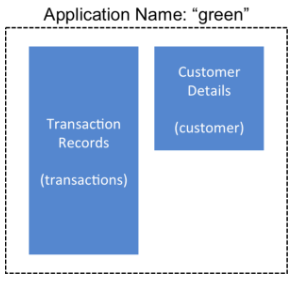
The following is an outline of the steps and examples of commands that are used to backup the data for the green application and to recover the data later. All commands are run when logged in as HBase superuser.
-
A backup set called green_set is created as an alias for both the transactions table and the customer table. The backup set can be used for all operations to avoid typing each table name. The backup set name is case-sensitive and should be formed with only printable characters and without spaces.
$ hbase backup set add green_set transactions $ hbase backup set add green_set customer -
The first backup of green_set data must be a full backup. The following command example shows how credentials are passed to Amazon S3 and specifies the file system with the s3a: prefix.
$ ACCESS_KEY=ABCDEFGHIJKLMNOPQRST $ SECRET_KEY=123456789abcdefghijklmnopqrstuvwxyzABCD $ sudo -u hbase hbase backup create full\ s3a://$ACCESS_KEY:SECRET_KEY@prodhbasebackups/backups -s green_set -
Incremental backups should be run according to a schedule that ensures essential data recovery in the event of a catastrophe. At this retail company, the HBase admin team decides that automated daily backups secures the data sufficiently. The team decides that they can implement this by modifying an existing Cron job that is defined in
/etc/crontab. Consequently, IT modifies the Cron job by adding the following line:@daily hbase hbase backup create incremental s3a://$ACCESS_KEY:$SECRET_KEY@prodhbasebackups/backups -s green_set -
A catastrophic IT incident disables the production cluster that the green application uses. An HBase system administrator of the backup cluster must restore the green_set dataset to the point in time closest to the recovery objective.
If the administrator of the backup HBase cluster has the backup ID with relevant details in accessible records, the following search with the
hdfs dfs -lscommand and manually scanning the backup ID list can be bypassed. Consider continuously maintaining and protecting a detailed log of backup IDs outside the production cluster in your environment.The HBase administrator runs the following command on the directory where backups are stored to print the list of successful backup IDs on the console:
hdfs dfs -ls -t /prodhbasebackups/backups -
The admin scans the list to see which backup was created at a date and time closest to the recovery objective. To do this, the admin converts the calendar timestamp of the recovery point in time to Unix time because backup IDs are uniquely identified with Unix time. The backup IDs are listed in reverse chronological order, meaning the most recent successful backup appears first.
The admin notices that the following line in the command output corresponds with the green_set backup that needs to be restored:
/prodhbasebackups/backups/backup_1467823988425` -
The admin restores green_set invoking the backup ID and the -overwrite option. The -overwrite option truncates all existing data in the destination and populates the tables with data from the backup dataset. Without this flag, the backup data is appended to the existing data in the destination. In this case, the admin decides to overwrite the data because it is corrupted.
$ sudo -u hbase hbase restore -s green_set \
  s3a://$ACCESS_KEY:$SECRET_KEY@prodhbasebackups/backups backup_1467823988425 \ -overwrite
Security of Backup Data
With this feature which makes copying data to remote locations, it's important to take a moment to clearly state the procedural concerns that exist around data security. Like the HBase replication feature, backup and restore provides the constructs to automatically copy data from within a corporate boundary to some system outside of that boundary. It is imperative when storing sensitive data that with backup and restore, much less any feature which extracts data from HBase, the locations to which data is being sent has undergone a security audit to ensure that only authenticated users are allowed to access that data.
For example, with the above example of backing up data to S3, it is of the utmost importance that the proper permissions are assigned to the S3 bucket to ensure that only a minimum set of authorized users are allowed to access this data. Because the data is no longer being accessed via HBase, and its authentication and authorization controls, we must ensure that the filesystem storing that data is providing a comparable level of security. This is a manual step which users must implement on their own.
Technical Details of Incremental Backup and Restore
HBase incremental backups enable more efficient capture of HBase table images than previous attempts at serial backup and restore solutions, such as those that only used HBase Export and Import APIs. Incremental backups use Write Ahead Logs (WALs) to capture the data changes since the previous backup was created. A WAL roll (create new WALs) is executed across all RegionServers to track the WALs that need to be in the backup. In addition to WALs, incremental backups also track bulk-loaded HFiles for tables under backup.
Incremental backup gathers all WAL files generated since the last backup from the source cluster,
converts them to HFiles in a .tmp directory under the BACKUP_ROOT, and then moves these
HFiles to their final location under the backup root directory to form the backup image.
It also reads bulk load records from the backup system table, forms the paths for the corresponding
bulk-loaded HFiles, and copies those files to the backup destination.
Bulk-loaded files are preserved (not deleted by cleaner chores) until they've been included in a
backup (for each backup root).
A process similar to the DistCp (distributed copy) tool is used to move the backup files to the
target file system.
When a table restore operation starts, a two-step process is initiated. First, the full backup is restored from the full backup image. Second, all HFiles from incremental backups between the last full backup and the incremental backup being restored (including bulk-loaded HFiles) are bulk loaded into the table using the HBase Bulk Load utility.
You can only restore on a live HBase cluster because the data must be redistributed to complete the restore operation successfully.
A Warning on File System Growth
As a reminder, incremental backups are implemented via retaining the write-ahead logs which HBase primarily uses for data durability. Thus, to ensure that all data needing to be included in a backup is still available in the system, the HBase backup and restore feature retains all write-ahead logs since the last backup until the next incremental backup is executed.
Like HBase Snapshots, this can have an expectedly large impact on the HDFS usage of HBase for high volume tables. Take care in enabling and using the backup and restore feature, specifically with a mind to removing backup sessions when they are not actively being used.
The only automated, upper-bound on retained write-ahead logs for backup and restore is based on the TTL of the hbase:backup system table which,
as of the time this document is written, is infinite (backup table entries are never automatically deleted). This requires that administrators
perform backups on a schedule whose frequency is relative to the amount of available space on HDFS (e.g. less available HDFS space requires
more aggressive backup merges and deletions). As a reminder, the TTL can be altered on the hbase:backup table using the alter command
in the HBase shell. Modifying the configuration property hbase.backup.system.ttl in hbase-site.xml after the system table exists has no effect.
Capacity Planning
When designing a distributed system deployment, it is critical that some basic mathmatical rigor is executed to ensure sufficient computational capacity is available given the data and software requirements of the system. For this feature, the availability of network capacity is the largest bottleneck when estimating the performance of some implementation of backup and restore. The second most costly function is the speed at which data can be read/written.
Full Backups
To estimate the duration of a full backup, we have to understand the general actions which are invoked:
- Write-ahead log roll on each RegionServer: ones to tens of seconds per RegionServer in parallel. Relative to the load on each RegionServer.
- Take an HBase snapshot of the table(s): tens of seconds. Relative to the number of regions and files that comprise the table.
- Export the snapshot to the destination: see below. Relative to the size of the data and the network bandwidth to the destination.
To approximate how long the final step will take, we have to make some assumptions on hardware. Be aware that these will not be accurate for your
system — these are numbers that your or your administrator know for your system. Let's say the speed of reading data from HDFS on a single node is
capped at 80MB/s (across all Mappers that run on that host), a modern network interface controller (NIC) supports 10Gb/s, the top-of-rack switch can
handle 40Gb/s, and the WAN between your clusters is 10Gb/s. This means that you can only ship data to your remote at a speed of 1.25GB/s — meaning
that 16 nodes (1.25 * 1024 / 80 = 16) participating in the ExportSnapshot should be able to fully saturate the link between clusters. With more
nodes in the cluster, we can still saturate the network but at a lesser impact on any one node which helps ensure local SLAs are made. If the size
of the snapshot is 10TB, this would full backup would take in the ballpark of 2.5 hours (10 * 1024 / 1.25 / (60 * 60) = 2.23hrs)
As a general statement, it is very likely that the WAN bandwidth between your local cluster and the remote storage is the largest bottleneck to the speed of a full backup.
When the concern is restricting the computational impact of backups to a "production system", the above formulas can be reused with the optional
command-line arguments to hbase backup create: -b, -w, -q. The -b option defines the bandwidth at which each worker (Mapper) would
write data. The -w argument limits the number of workers that would be spawned in the DistCp job. The -q allows the user to specify a YARN
queue which can limit the specific nodes where the workers will be spawned — this can quarantine the backup workers performing the copy to
a set of non-critical nodes. Relating the -b and -w options to our earlier equations: -b would be used to restrict each node from reading
data at the full 80MB/s and -w is used to limit the job from spawning 16 worker tasks.
Incremental Backup
Like we did for full backups, we have to understand the incremental backup process to approximate its runtime and cost.
- Identify new write-ahead logs since the last full or incremental backup: negligible. Apriori knowledge from the backup system table(s).
- Read, filter, and write "minimized" HFiles equivalent to the WALs: dominated by the speed of writing data. Relative to write speed of HDFS.
- Read bulk load records from the backup system table, form the paths for bulk-loaded HFiles, and copy them to the backup destination.
- DistCp the HFiles to the destination: see above.
For the second step, the dominating cost of this operation would be the re-writing the data (under the assumption that a majority of the data in the WAL is preserved). In this case, we can assume an aggregate write speed of 30MB/s per node. Continuing our 16-node cluster example, this would require approximately 15 minutes to perform this step for 50GB of data (50 * 1024 / 60 / 60 = 14.2). The amount of time to start the DistCp MapReduce job would likely dominate the actual time taken to copy the data (50 / 1.25 = 40 seconds) and can be ignored.
Limitations of the Backup and Restore Utility
Serial backup operations
Backup operations cannot be run concurrently. An operation includes actions like create, delete, restore, and merge. Only one active backup session is supported. HBASE-16391
will introduce multiple-backup sessions support.
No means to cancel backups
Both backup and restore operations cannot be canceled. (HBASE-15997, HBASE-15998).
The workaround to cancel a backup would be to kill the client-side backup command (control-C), ensure all relevant MapReduce jobs have exited, and then
run the hbase backup repair command to ensure the system backup metadata is consistent.
Backups can only be saved to a single location
Copying backup information to multiple locations is an exercise left to the user. HBASE-15476 will
introduce the ability to specify multiple-backup destinations intrinsically.
HBase superuser access is required
Only an HBase superuser (e.g. hbase) is allowed to perform backup/restore, can pose a problem for shared HBase installations. Current mitigations would require
coordination with system administrators to build and deploy a backup and restore strategy (HBASE-14138).
Backup restoration is an online operation
To perform a restore from a backup, it requires that the HBase cluster is online as a caveat of the current implementation (HBASE-16573).
Some operations may fail and require re-run
The HBase backup feature is primarily client driven. While there is the standard HBase retry logic built into the HBase Connection, persistent errors in executing operations
may propagate back to the client (e.g. snapshot failure due to region splits). The backup implementation should be moved from client-side into the ProcedureV2 framework
in the future which would provide additional robustness around transient/retryable failures. The hbase backup repair command is meant to correct states which the system
cannot automatically detect and recover from.
Avoidance of declaration of public API
While the Java API to interact with this feature exists and its implementation is separated from an interface, insufficient rigor has been applied to determine if
it is exactly what we intend to ship to users. As such, it is marked as for a Private audience with the expectation that, as users begin to try the feature, there
will be modifications that would necessitate breaking compatibility (HBASE-17517).
Lack of global metrics for backup and restore
Individual backup and restore operations contain metrics about the amount of work the operation included, but there is no centralized location (e.g. the Master UI)
which present information for consumption (HBASE-16565).