Overview
Introduction to HBase backup and restore feature, including full and incremental backups for disaster recovery and point-in-time recovery.
Backup and restore is a standard operation provided by many databases. An effective backup and restore strategy helps ensure that users can recover data in case of unexpected failures. The HBase backup and restore feature helps ensure that enterprises using HBase as a canonical data repository can recover from catastrophic failures. Another important feature is the ability to restore the database to a particular point-in-time, commonly referred to as a snapshot.
The HBase backup and restore feature provides the ability to create full backups and incremental backups on tables in an HBase cluster. The full backup is the foundation on which incremental backups are applied to build iterative snapshots. Incremental backups can be run on a schedule to capture changes over time, for example by using a Cron task. Incremental backups are more cost-effective than full backups because they only capture the changes since the last backup and they also enable administrators to restore the database to any prior incremental backup. Furthermore, the utilities also enable table-level data backup-and-recovery if you do not want to restore the entire dataset of the backup.
The backup and restore feature supplements the HBase Replication feature. While HBase replication is ideal for creating "hot" copies of the data (where the replicated data is immediately available for query), the backup and restore feature is ideal for creating "cold" copies of data (where a manual step must be taken to restore the system). Previously, users only had the ability to create full backups via the ExportSnapshot functionality. The incremental backup implementation is the novel improvement over the previous "art" provided by ExportSnapshot.
The backup and restore feature uses DistCp to transfer files between clusters . HADOOP-15850 fixes a bug where CopyCommitter#concatFileChunks unconditionally tried to concatenate the files being DistCp'ed to target cluster (though the files are independent) . Without the fix from HADOOP-15850 , the transfer would fail. So the backup and restore feature need hadoop version as below
- 2.7.x
- 2.8.x
- 2.9.2+
- 2.10.0+
- 3.0.4+
- 3.1.2+
- 3.2.0+
- 3.3.0+
Terminology
The backup and restore feature introduces new terminology which can be used to understand how control flows through the system.
- A backup: A logical unit of data and metadata which can restore a table to its state at a specific point in time.
- Full backup: a type of backup which wholly encapsulates the contents of the table at a point in time.
- Incremental backup: a type of backup which contains the changes in a table since a full backup.
- Backup set: A user-defined name which references one or more tables over which a backup can be executed.
- Backup ID: A unique names which identifies one backup from the rest, e.g.
backupId_1467823988425
Planning
There are some common strategies which can be used to implement backup and restore in your environment. The following section shows how these strategies are implemented and identifies potential tradeoffs with each.
This backup and restore tools has not been tested on Transparent Data Encryption (TDE) enabled HDFS clusters. This is related to the open issue HBASE-16178.
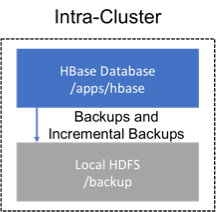
Backup within a cluster
This strategy stores the backups on the same cluster as where the backup was taken. This approach is only appropriate for testing as it does not provide any additional safety on top of what the software itself already provides.
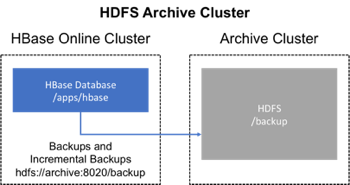
Backup using a dedicated cluster
This strategy provides greater fault tolerance and provides a path towards disaster recovery. In this setting, you will store the backup on a separate HDFS cluster by supplying the backup destination cluster's HDFS URL to the backup utility. You should consider backing up to a different physical location, such as a different data center.
Typically, a backup-dedicated HDFS cluster uses a more economical hardware profile to save money.
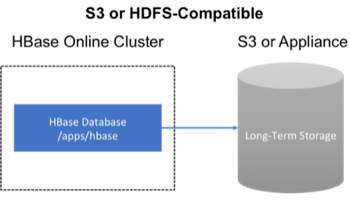
Backup to the Cloud or a storage vendor appliance
Another approach to safeguarding HBase incremental backups is to store the data on provisioned, secure servers that belong to third-party vendors and that are located off-site. The vendor can be a public cloud provider or a storage vendor who uses a Hadoop-compatible file system, such as S3 and other HDFS-compatible destinations.
The HBase backup utility does not support backup to multiple destinations. A workaround is to manually create copies of the backup files from HDFS or S3.
First-time configuration steps
This section contains the necessary configuration changes that must be made in order to use the backup and restore feature.
As this feature makes significant use of YARN's MapReduce framework to parallelize these I/O heavy operations, configuration
changes extend outside of just hbase-site.xml.
Allow the "hbase" system user in YARN
The YARN container-executor.cfg configuration file must have the following property setting: allowed.system.users=hbase. No spaces are allowed in entries of this configuration file.
Skipping this step will result in runtime errors when executing the first backup tasks.
Example of a valid container-executor.cfg file for backup and restore:
yarn.nodemanager.log-dirs=/var/log/hadoop/mapred
yarn.nodemanager.linux-container-executor.group=yarn
banned.users=hdfs,yarn,mapred,bin
allowed.system.users=hbase
min.user.id=500
HBase specific changes
Add the following properties to hbase-site.xml and restart HBase if it is already running.
The ",..." is an ellipsis meant to imply that this is a comma-separated list of values, not literal text which should be added to hbase-site.xml.
<property>
  <name>hbase.backup.enable</name>
  <value>true</value>
</property>
<property>
  <name>hbase.master.logcleaner.plugins</name>
  <value>org.apache.hadoop.hbase.backup.master.BackupLogCleaner,...</value>
</property>
<property>
  <name>hbase.procedure.master.classes</name>
  <value>org.apache.hadoop.hbase.backup.master.LogRollMasterProcedureManager,...</value>
</property>
<property>
  <name>hbase.procedure.regionserver.classes</name>
  <value>org.apache.hadoop.hbase.backup.regionserver.LogRollRegionServerProcedureManager,...</value>
</property>
<property>
  <name>hbase.coprocessor.region.classes</name>
  <value>org.apache.hadoop.hbase.backup.BackupObserver,...</value>
</property>
<property>
  <name>hbase.coprocessor.master.classes</name>
  <value>org.apache.hadoop.hbase.backup.BackupMasterObserver,...</value>
</property>
<property>
  <name>hbase.master.hfilecleaner.plugins</name>
  <value>org.apache.hadoop.hbase.backup.BackupHFileCleaner,...</value>
</property>