Understanding HBase regions, stores, memstore, write-ahead log (WAL), compaction, splits, and region management strategies.
Regions are the basic element of availability and distribution for tables, and are comprised of a Store per Column Family. The hierarchy of objects is as follows:
Table                    (HBase table)
    Region               (Regions for the table)
        Store            (Store per ColumnFamily for each Region for the table)
            MemStore     (MemStore for each Store for each Region for the table)
            StoreFile    (StoreFiles for each Store for each Region for the table)
                Block    (Blocks within a StoreFile within a Store for each Region for the table)
In general, HBase is designed to run with a small (20-200) number of relatively large (5-20Gb) regions per server. The considerations for this are as follows:
Typically you want to keep your region count low on HBase for numerous reasons. Usually right around 100 regions per RegionServer has yielded the best results. Here are some of the reasons below for keeping region count low:
MSLAB (MemStore-local allocation buffer) requires 2MB per MemStore (that's 2MB per family per region). 1000 regions that have 2 families each is 3.9GB of heap used, and it's not even storing data yet. NB: the 2MB value is configurable.
If you fill all the regions at somewhat the same rate, the global memory usage makes it that it forces tiny flushes when you have too many regions which in turn generates compactions. Rewriting the same data tens of times is the last thing you want. An example is filling 1000 regions (with one family) equally and let's consider a lower bound for global MemStore usage of 5GB (the region server would have a big heap). Once it reaches 5GB it will force flush the biggest region, at that point they should almost all have about 5MB of data so it would flush that amount. 5MB inserted later, it would flush another region that will now have a bit over 5MB of data, and so on. This is currently the main limiting factor for the number of regions; see Number of regions per RS - upper bound for detailed formula.
The master as is is allergic to tons of regions, and will take a lot of time assigning them and moving them around in batches. The reason is that it's heavy on ZK usage, and it's not very async at the moment (could really be improved — and has been improved a bunch in 0.96 HBase).
In older versions of HBase (pre-HFile v2, 0.90 and previous), tons of regions on a few RS can cause the store file index to rise, increasing heap usage and potentially creating memory pressure or OOME on the RSs
Another issue is the effect of the number of regions on MapReduce jobs; it is typical to have one mapper per HBase region. Thus, hosting only 5 regions per RS may not be enough to get sufficient number of tasks for a MapReduce job, while 1000 regions will generate far too many tasks.
When HBase starts regions are assigned as follows (short version):
The Master invokes the AssignmentManager upon startup.
The AssignmentManager looks at the existing region assignments in hbase:meta.
If the region assignment is still valid (i.e., if the RegionServer is still online) then the assignment is kept.
If the assignment is invalid, then the LoadBalancerFactory is invoked to assign the region. The load balancer (StochasticLoadBalancer by default in HBase 1.0) assign the region to a RegionServer.
hbase:meta is updated with the RegionServer assignment (if needed) and the RegionServer start codes (start time of the RegionServer process) upon region opening by the RegionServer.
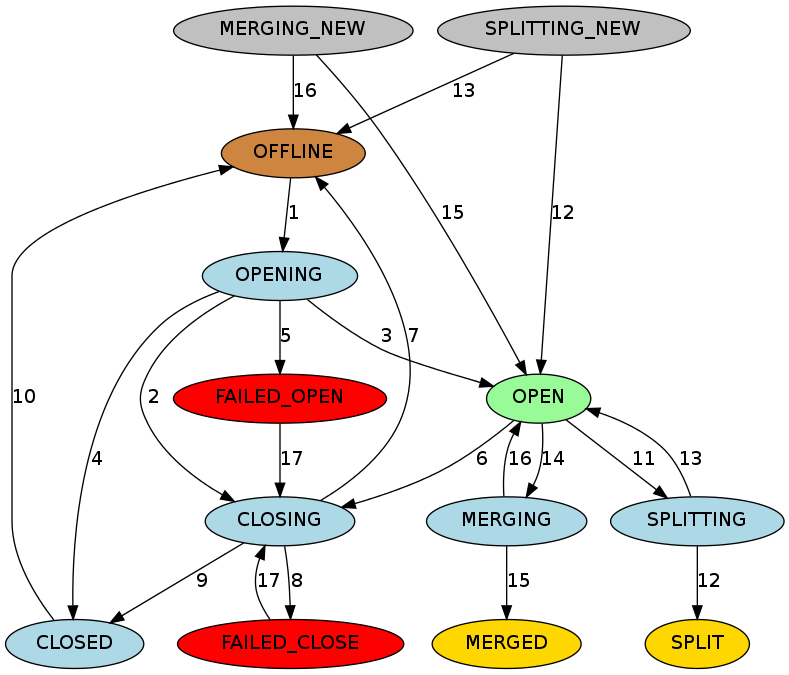
HBase maintains a state for each region and persists the state in hbase:meta. The state of the hbase:meta region itself is persisted in ZooKeeper. You can see the states of regions in transition in the Master web UI. Following is the list of possible region states.
Possible Region States:
OFFLINE: the region is offline and not opening
OPENING: the region is in the process of being opened
OPEN: the region is open and the RegionServer has notified the master
FAILED_OPEN: the RegionServer failed to open the region
CLOSING: the region is in the process of being closed
CLOSED: the RegionServer has closed the region and notified the master
FAILED_CLOSE: the RegionServer failed to close the region
SPLITTING: the RegionServer notified the master that the region is splitting
SPLIT: the RegionServer notified the master that the region has finished splitting
SPLITTING_NEW: this region is being created by a split which is in progress
MERGING: the RegionServer notified the master that this region is being merged with another region
MERGED: the RegionServer notified the master that this region has been merged
MERGING_NEW: this region is being created by a merge of two regions
Graph Legend:
Brown: Offline state, a special state that can be transient (after closed before opening), terminal (regions of disabled tables), or initial (regions of newly created tables)
Palegreen: Online state that regions can serve requests
Lightblue: Transient states
Red: Failure states that need OPS attention
Gold: Terminal states of regions split/merged
Grey: Initial states of regions created through split/merge
Transition State Descriptions:
The master moves a region from OFFLINE to OPENING state and tries to assign the region to a RegionServer. The RegionServer may or may not have received the open region request. The master retries sending the open region request to the RegionServer until the RPC goes through or the master runs out of retries. After the RegionServer receives the open region request, the RegionServer begins opening the region.
If the master is running out of retries, the master prevents the RegionServer from opening the region by moving the region to CLOSING state and trying to close it, even if the RegionServer is starting to open the region.
After the RegionServer opens the region, it continues to try to notify the master until the master moves the region to OPEN state and notifies the RegionServer. The region is now open.
If the RegionServer cannot open the region, it notifies the master. The master moves the region to CLOSED state and tries to open the region on a different RegionServer.
If the master cannot open the region on any of a certain number of regions, it moves the region to FAILED_OPEN state, and takes no further action until an operator intervenes from the HBase shell, or the server is dead.
The master moves a region from OPEN to CLOSING state. The RegionServer holding the region may or may not have received the close region request. The master retries sending the close request to the server until the RPC goes through or the master runs out of retries.
If the RegionServer is not online, or throws NotServingRegionException, the master moves the region to OFFLINE state and re-assigns it to a different RegionServer.
If the RegionServer is online, but not reachable after the master runs out of retries, the master moves the region to FAILED_CLOSE state and takes no further action until an operator intervenes from the HBase shell, or the server is dead.
If the RegionServer gets the close region request, it closes the region and notifies the master. The master moves the region to CLOSED state and re-assigns it to a different RegionServer.
Before assigning a region, the master moves the region to OFFLINE state automatically if it is in CLOSED state.
When a RegionServer is about to split a region, it notifies the master. The master moves the region to be split from OPEN to SPLITTING state and add the two new regions to be created to the RegionServer. These two regions are in SPLITTING_NEW state initially.
After notifying the master, the RegionServer starts to split the region. Once past the point of no return, the RegionServer notifies the master again so the master can update the hbase:meta table. However, the master does not update the region states until it is notified by the server that the split is done. If the split is successful, the splitting region is moved from SPLITTING to SPLIT state and the two new regions are moved from SPLITTING_NEW to OPEN state.
If the split fails, the splitting region is moved from SPLITTING back to OPEN state, and the two new regions which were created are moved from SPLITTING_NEW to OFFLINE state.
When a RegionServer is about to merge two regions, it notifies the master first. The master moves the two regions to be merged from OPEN to MERGING state, and adds the new region which will hold the contents of the merged regions region to the RegionServer. The new region is in MERGING_NEW state initially.
After notifying the master, the RegionServer starts to merge the two regions. Once past the point of no return, the RegionServer notifies the master again so the master can update the META. However, the master does not update the region states until it is notified by the RegionServer that the merge has completed. If the merge is successful, the two merging regions are moved from MERGING to MERGED state and the new region is moved from MERGING_NEW to OPEN state.
If the merge fails, the two merging regions are moved from MERGING back to OPEN state, and the new region which was created to hold the contents of the merged regions is moved from MERGING_NEW to OFFLINE state.
For regions in FAILED_OPEN or FAILED_CLOSE states, the master tries to close them again when they are reassigned by an operator via HBase Shell.
Over time, Region-RegionServer locality is achieved via HDFS block replication. The HDFS client does the following by default when choosing locations to write replicas:
First replica is written to local node
Second replica is written to a random node on another rack
Third replica is written on the same rack as the second, but on a different node chosen randomly
Subsequent replicas are written on random nodes on the cluster. See Replica Placement: The First Baby Steps on this page: HDFS Architecture
Thus, HBase eventually achieves locality for a region after a flush or a compaction. In a RegionServer failover situation a RegionServer may be assigned regions with non-local StoreFiles (because none of the replicas are local), however as new data is written in the region, or the table is compacted and StoreFiles are re-written, they will become "local" to the RegionServer.
Regions split when they reach a configured threshold. Below we treat the topic in short. For a longer exposition, see Apache HBase Region Splitting and Merging by our Enis Soztutar.
Splits run unaided on the RegionServer; i.e. the Master does not participate. The RegionServer splits a region, offlines the split region and then adds the daughter regions to hbase:meta, opens daughters on the parent's hosting RegionServer and then reports the split to the Master. See Managed Splitting for how to manually manage splits (and for why you might do this).
It is possible to manually split your table, either at table creation (pre-splitting), or at a later time as an administrative action. You might choose to split your region for one or more of the following reasons. There may be other valid reasons, but the need to manually split your table might also point to problems with your schema design.
Reasons to Manually Split Your Table:
Your data is sorted by timeseries or another similar algorithm that sorts new data at the end of the table. This means that the Region Server holding the last region is always under load, and the other Region Servers are idle, or mostly idle. See also Monotonically Increasing Row Keys/Timeseries Data.
You have developed an unexpected hotspot in one region of your table. For instance, an application which tracks web searches might be inundated by a lot of searches for a celebrity in the event of news about that celebrity. See perf.one.region for more discussion about this particular scenario.
After a big increase in the number of RegionServers in your cluster, to get the load spread out quickly.
Before a bulk-load which is likely to cause unusual and uneven load across regions.
See Managed Splitting for a discussion about the dangers and possible benefits of managing splitting completely manually.
The DisabledRegionSplitPolicy policy blocks manual region splitting.
The goal of splitting your table manually is to improve the chances of balancing the load across the cluster in situations where good rowkey design alone won't get you there. Keeping that in mind, the way you split your regions is very dependent upon the characteristics of your data. It may be that you already know the best way to split your table. If not, the way you split your table depends on what your keys are like.
Alphanumeric Rowkeys
If your rowkeys start with a letter or number, you can split your table at letter or number boundaries. For instance, the following command creates a table with regions that split at each vowel, so the first region has A-D, the second region has E-H, the third region has I-N, the fourth region has O-V, and the fifth region has U-Z.
Using a Custom Algorithm
The RegionSplitter tool is provided with HBase, and uses a SplitAlgorithm to determine split points for you. As parameters, you give it the algorithm, desired number of regions, and column families. It includes three split algorithms. The first is the HexStringSplit algorithm, which assumes the row keys are hexadecimal strings. The second is the DecimalStringSplit algorithm, which assumes the row keys are decimal strings in the range 00000000 to 99999999. The third, UniformSplit, assumes the row keys are random byte arrays. You will probably need to develop your own SplitAlgorithm, using the provided ones as models.
Both Master and RegionServer participate in the event of online region merges. Client sends merge RPC to the master, then the master moves the regions together to the RegionServer where the more heavily loaded region resided. Finally the master sends the merge request to this RegionServer which then runs the merge. Similar to process of region splitting, region merges run as a local transaction on the RegionServer. It offlines the regions and then merges two regions on the file system, atomically delete merging regions from hbase:meta and adds the merged region to hbase:meta, opens the merged region on the RegionServer and reports the merge to the Master.
It's an asynchronous operation and call returns immediately without waiting merge completed. Passing true as the optional third parameter will force a merge. Normally only adjacent regions can be merged. The force parameter overrides this behaviour and is for expert use only.
The MemStore holds in-memory modifications to the Store. Modifications are Cells/KeyValues. When a flush is requested, the current MemStore is moved to a snapshot and is cleared. HBase continues to serve edits from the new MemStore and backing snapshot until the flusher reports that the flush succeeded. At this point, the snapshot is discarded. Note that when the flush happens, MemStores that belong to the same region will all be flushed.
A MemStore flush can be triggered under any of the conditions listed below. The minimum flush unit is per region, not at individual MemStore level.
When a MemStore reaches the size specified by hbase.hregion.memstore.flush.size, all MemStores that belong to its region will be flushed out to disk.
When the overall MemStore usage reaches the value specified by hbase.regionserver.global.memstore.upperLimit, MemStores from various regions will be flushed out to disk to reduce overall MemStore usage in a RegionServer.
The flush order is based on the descending order of a region's MemStore usage. Regions will have their MemStores flushed until the overall MemStore usage drops to or slightly below hbase.regionserver.global.memstore.lowerLimit.
When the number of WAL log entries in a given region server's WAL reaches the value specified in hbase.regionserver.max.logs, MemStores from various regions will be flushed out to disk to reduce the number of logs in the WAL.
The flush order is based on time. Regions with the oldest MemStores are flushed first until WAL count drops below hbase.regionserver.max.logs.
When a client issues a scan against a table, HBase generates RegionScanner objects, one per region, to serve the scan request.
The RegionScanner object contains a list of StoreScanner objects, one per column family.
Each StoreScanner object further contains a list of StoreFileScanner objects, corresponding to each StoreFile and HFile of the corresponding column family, and a list of KeyValueScanner objects for the MemStore.
The two lists are merged into one, which is sorted in ascending order with the scan object for the MemStore at the end of the list.
When a StoreFileScanner object is constructed, it is associated with a MultiVersionConcurrencyControl read point, which is the current memstoreTS, filtering out any new updates beyond the read point.
The HFile file format is based on the SSTable file described in the BigTable [2006] paper and on Hadoop's TFile (The unit test suite and the compression harness were taken directly from TFile). Schubert Zhang's blog post on HFile: A Block-Indexed File Format to Store Sorted Key-Value Pairs makes for a thorough introduction to HBase's HFile. Matteo Bertozzi has also put up a helpful description, HBase I/O: HFile.
If you leave off the option -v to see just a summary on the HFile. See usage for other things to do with the hfile tool.
In the output of this tool, you might see 'seqid=0' for certain keys in places such as
'Mid-key'/'firstKey'/'lastKey'. These are 'KeyOnlyKeyValue' type instances - meaning their seqid
is irrelevant & we just need the keys of these Key-Value instances.
The KeyValue class is the heart of data storage in HBase. KeyValue wraps a byte array and takes offsets and lengths into the passed array which specify where to start interpreting the content as KeyValue.
KeyValue instances are not split across blocks. For example, if there is an 8 MB KeyValue, even if the block-size is 64kb this KeyValue will be read in as a coherent block. For more information, see the KeyValue source code.
To emphasize the points above, examine what happens with two Puts for two different columns for the same row:
Put #1: rowkey=row1, cf:attr1=value1
Put #2: rowkey=row1, cf:attr2=value2
Even though these are for the same row, a KeyValue is created for each column:
Key portion for Put #1:
rowlength -----------→ 4
row -----------------→ row1
columnfamilylength --→ 2
columnfamily --------→ cf
columnqualifier -----→ attr1
timestamp -----------→ server time of Put
keytype -------------→ Put
Key portion for Put #2:
rowlength -----------→ 4
row -----------------→ row1
columnfamilylength --→ 2
columnfamily --------→ cf
columnqualifier -----→ attr2
timestamp -----------→ server time of Put
keytype -------------→ Put
It is critical to understand that the rowkey, ColumnFamily, and column (aka columnqualifier) are embedded within the KeyValue instance. The longer these identifiers are, the bigger the KeyValue is.
A StoreFile is a facade of HFile. In terms of compaction, use of StoreFile seems to have prevailed in the past.
A Store is the same thing as a ColumnFamily. StoreFiles are related to a Store, or ColumnFamily.
If you want to read more about StoreFiles versus HFiles and Stores versus ColumnFamilies, see HBASE-11316.
When the MemStore reaches a given size (hbase.hregion.memstore.flush.size), it flushes its contents to a StoreFile. The number of StoreFiles in a Store increases over time. Compaction is an operation which reduces the number of StoreFiles in a Store, by merging them together, in order to increase performance on read operations. Compactions can be resource-intensive to perform, and can either help or hinder performance depending on many factors.
Compactions fall into two categories: minor and major. Minor and major compactions differ in the following ways.
Minor compactions usually select a small number of small, adjacent StoreFiles and rewrite them as a single StoreFile. Minor compactions do not drop (filter out) deletes or expired versions, because of potential side effects. See Compaction and Deletions and Compaction and Versions for information on how deletes and versions are handled in relation to compactions. The end result of a minor compaction is fewer, larger StoreFiles for a given Store.
The end result of a major compaction is a single StoreFile per Store. Major compactions also process delete markers and max versions. See Compaction and Deletions and Compaction and Versions for information on how deletes and versions are handled in relation to compactions.
When an explicit deletion occurs in HBase, the data is not actually deleted. Instead, a tombstone marker is written. The tombstone marker prevents the data from being returned with queries. During a major compaction, the data is actually deleted, and the tombstone marker is removed from the StoreFile. If the deletion happens because of an expired TTL, no tombstone is created. Instead, the expired data is filtered out and is not written back to the compacted StoreFile.
When you create a Column Family, you can specify the maximum number of versions to keep, by specifying ColumnFamilyDescriptorBuilder.setMaxVersions(int versions). The default value is 1. If more versions than the specified maximum exist, the excess versions are filtered out and not written back to the compacted StoreFile.
In some situations, older versions can be inadvertently resurrected if a newer version is
explicitly deleted. See Major compactions change query
results for a more in-depth explanation.
This situation is only possible before the compaction finishes.
In theory, major compactions improve performance. However, on a highly loaded system, major compactions can require an inappropriate number of resources and adversely affect performance. In a default configuration, major compactions are scheduled automatically to run once in a 7-day period. This is sometimes inappropriate for systems in production. You can manage major compactions manually. See Managed Compactions.
Compactions do not perform region merges. See Merge for more information on region merging.
We can switch on and off the compactions at region servers. Switching off compactions will also interrupt any currently ongoing compactions. It can be done dynamically using the "compaction_switch" command from hbase shell. If done from the command line, this setting will be lost on restart of the server. To persist the changes across region servers modify the configuration hbase.regionserver .compaction.enabled in hbase-site.xml and restart HBase.
Compacting large StoreFiles, or too many StoreFiles at once, can cause more IO load than your cluster is able to handle without causing performance problems. The method by which HBase selects which StoreFiles to include in a compaction (and whether the compaction is a minor or major compaction) is called the compaction policy.
Prior to HBase 0.96.x, there was only one compaction policy. That original compaction policy is still available as RatioBasedCompactionPolicy. The new compaction default policy, called ExploringCompactionPolicy, was subsequently backported to HBase 0.94 and HBase 0.95, and is the default in HBase 0.96 and newer. It was implemented in HBASE-7842. In short, ExploringCompactionPolicy attempts to select the best possible set of StoreFiles to compact with the least amount of work, while the RatioBasedCompactionPolicy selects the first set that meets the criteria.
Regardless of the compaction policy used, file selection is controlled by several configurable parameters and happens in a multi-step approach. These parameters will be explained in context, and then will be given in a table which shows their descriptions, defaults, and implications of changing them.
When the MemStore gets too large, it needs to flush its contents to a StoreFile. However, Stores are configured with a bound on the number StoreFiles, hbase.hstore.blockingStoreFiles, and if in excess, the MemStore flush must wait until the StoreFile count is reduced by one or more compactions. If the MemStore is too large and the number of StoreFiles is also too high, the algorithm is said to be "stuck". By default we'll wait on compactions up to hbase.hstore.blockingWaitTime milliseconds. If this period expires, we'll flush anyways even though we are in excess of the hbase.hstore.blockingStoreFiles count.
Upping the hbase.hstore.blockingStoreFiles count will allow flushes to happen but a Store with many StoreFiles in will likely have higher read latencies. Try to figure why Compactions are not keeping up. Is it a write spurt that is bringing about this situation or is a regular occurance and the cluster is under-provisioned for the volume of writes?
The ExploringCompactionPolicy algorithm considers each possible set of adjacent StoreFiles before choosing the set where compaction will have the most benefit.
One situation where the ExploringCompactionPolicy works especially well is when you are bulk-loading data and the bulk loads create larger StoreFiles than the StoreFiles which are holding data older than the bulk-loaded data. This can "trick" HBase into choosing to perform a major compaction each time a compaction is needed, and cause a lot of extra overhead. With the ExploringCompactionPolicy, major compactions happen much less frequently because minor compactions are more efficient.
In general, ExploringCompactionPolicy is the right choice for most situations, and thus is the default compaction policy. You can also use ExploringCompactionPolicy along with Experimental: Stripe Compactions.
The logic of this policy can be examined in hbase-server/src/main/java/org/apache/hadoop/hbase/regionserver/compactions/ExploringCompactionPolicy.java. The following is a walk-through of the logic of the ExploringCompactionPolicy.
Make a list of all existing StoreFiles in the Store. The rest of the algorithm filters this list to come up with the subset of HFiles which will be chosen for compaction.
If this was a user-requested compaction, attempt to perform the requested compaction type, regardless of what would normally be chosen. Note that even if the user requests a major compaction, it may not be possible to perform a major compaction. This may be because not all StoreFiles in the Column Family are available to compact or because there are too many Stores in the Column Family.
Some StoreFiles are automatically excluded from consideration. These include:
StoreFiles that are larger than hbase.hstore.compaction.max.size
StoreFiles that were created by a bulk-load operation which explicitly excluded compaction. You may decide to exclude StoreFiles resulting from bulk loads, from compaction. To do this, specify the hbase.mapreduce.hfileoutputformat.compaction.exclude parameter during the bulk load operation.
Iterate through the list from step 1, and make a list of all potential sets of StoreFiles to compact together. A potential set is a grouping of hbase.hstore.compaction.min contiguous StoreFiles in the list. For each set, perform some sanity-checking and figure out whether this is the best compaction that could be done:
If the number of StoreFiles in this set (not the size of the StoreFiles) is fewer than hbase.hstore.compaction.min or more than hbase.hstore.compaction.max, take it out of consideration.
Compare the size of this set of StoreFiles with the size of the smallest possible compaction that has been found in the list so far. If the size of this set of StoreFiles represents the smallest compaction that could be done, store it to be used as a fall-back if the algorithm is "stuck" and no StoreFiles would otherwise be chosen. See Being Stuck.
Do size-based sanity checks against each StoreFile in this set of StoreFiles.
If the size of this StoreFile is larger than hbase.hstore.compaction.max.size, take it out of consideration.
If the size is greater than or equal to hbase.hstore.compaction.min.size, sanity-check it against the file-based ratio to see whether it is too large to be considered.
The sanity-checking is successful if:
There is only one StoreFile in this set, or
For each StoreFile, its size multiplied by hbase.hstore.compaction.ratio (or hbase.hstore.compaction.ratio.offpeak if off-peak hours are configured and it is during off-peak hours) is less than the sum of the sizes of the other HFiles in the set.
If this set of StoreFiles is still in consideration, compare it to the previously-selected best compaction. If it is better, replace the previously-selected best compaction with this one.
When the entire list of potential compactions has been processed, perform the best compaction that was found. If no StoreFiles were selected for compaction, but there are multiple StoreFiles, assume the algorithm is stuck (see Being Stuck) and if so, perform the smallest compaction that was found in step 3.
The RatioBasedCompactionPolicy was the only compaction policy prior to HBase 0.96, though ExploringCompactionPolicy has now been backported to HBase 0.94 and 0.95. To use the RatioBasedCompactionPolicy rather than the ExploringCompactionPolicy, set hbase.hstore.defaultengine.compactionpolicy.class to RatioBasedCompactionPolicy in the hbase-site.xml file. To switch back to the ExploringCompactionPolicy, remove the setting from the hbase-site.xml.
The following section walks you through the algorithm used to select StoreFiles for compaction in the RatioBasedCompactionPolicy.
The first phase is to create a list of all candidates for compaction. A list is created of all StoreFiles not already in the compaction queue, and all StoreFiles newer than the newest file that is currently being compacted. This list of StoreFiles is ordered by the sequence ID. The sequence ID is generated when a Put is appended to the write-ahead log (WAL), and is stored in the metadata of the HFile.
Check to see if the algorithm is stuck (see Being Stuck, and if so, a major compaction is forced. This is a key area where The ExploringCompactionPolicy Algorithm is often a better choice than the RatioBasedCompactionPolicy.
If the compaction was user-requested, try to perform the type of compaction that was requested. Note that a major compaction may not be possible if all HFiles are not available for compaction or if too many StoreFiles exist (more than hbase.hstore.compaction.max).
Some StoreFiles are automatically excluded from consideration. These include:
StoreFiles that are larger than hbase.hstore.compaction.max.size
StoreFiles that were created by a bulk-load operation which explicitly excluded compaction. You may decide to exclude StoreFiles resulting from bulk loads, from compaction. To do this, specify the hbase.mapreduce.hfileoutputformat.compaction.exclude parameter during the bulk load operation.
The maximum number of StoreFiles allowed in a major compaction is controlled by the hbase.hstore.compaction.max parameter. If the list contains more than this number of StoreFiles, a minor compaction is performed even if a major compaction would otherwise have been done. However, a user-requested major compaction still occurs even if there are more than hbase.hstore.compaction.max StoreFiles to compact.
If the list contains fewer than hbase.hstore.compaction.min StoreFiles to compact, a minor compaction is aborted. Note that a major compaction can be performed on a single HFile. Its function is to remove deletes and expired versions, and reset locality on the StoreFile.
The value of the hbase.hstore.compaction.ratio parameter is multiplied by the sum of StoreFiles smaller than a given file, to determine whether that StoreFile is selected for compaction during a minor compaction. For instance, if hbase.hstore.compaction.ratio is 1.2, FileX is 5MB, FileY is 2MB, and FileZ is 3MB:
5 <= 1.2 x (2 + 3) or 5 <= 6
In this scenario, FileX is eligible for minor compaction. If FileX were 7MB, it would not be eligible for minor compaction. This ratio favors smaller StoreFile. You can configure a different ratio for use in off-peak hours, using the parameter hbase.hstore.compaction.ratio.offpeak, if you also configure hbase.offpeak.start.hour and hbase.offpeak.end.hour.
If the last major compaction was too long ago and there is more than one StoreFile to be compacted, a major compaction is run, even if it would otherwise have been minor. By default, the maximum time between major compactions is 7 days, plus or minus a 4.8 hour period, and determined randomly within those parameters. Prior to HBase 0.96, the major compaction period was 24 hours. See hbase.hregion.majorcompaction in the table below to tune or disable time-based major compactions.
This table contains the main configuration parameters for compaction. This list is not exhaustive. To tune these parameters from the defaults, edit the hbase-default.xml file. For a full list of all configuration parameters available, see config.files
hbase.hstore.compaction.min
The minimum number of StoreFiles which must be eligible for compaction before compaction can run. The goal of tuning hbase.hstore.compaction.min is to avoid ending up with too many tiny StoreFiles to compact. Setting this value to 2 would cause a minor compaction each time you have two StoreFiles in a Store, and this is probably not appropriate. If you set this value too high, all the other values will need to be adjusted accordingly. For most cases, the default value is appropriate. In previous versions of HBase, the parameter hbase.hstore.compaction.min was called hbase.hstore.compactionThreshold. Default: 3
hbase.hstore.compaction.max
The maximum number of StoreFiles which will be selected for a single minor compaction, regardless of the number of eligible StoreFiles. Effectively, the value of hbase.hstore.compaction.max controls the length of time it takes a single compaction to complete. Setting it larger means that more StoreFiles are included in a compaction. For most cases, the default value is appropriate. Default: 10
hbase.hstore.compaction.min.size
A StoreFile smaller than this size will always be eligible for minor compaction. StoreFiles this size or larger are evaluated by hbase.hstore.compaction.ratio to determine if they are eligible. Because this limit represents the "automatic include" limit for all StoreFiles smaller than this value, this value may need to be reduced in write-heavy environments where many files in the 1-2 MB range are being flushed, because every StoreFile will be targeted for compaction and the resulting StoreFiles may still be under the minimum size and require further compaction. If this parameter is lowered, the ratio check is triggered more quickly. This addressed some issues seen in earlier versions of HBase but changing this parameter is no longer necessary in most situations. Default:128 MB
hbase.hstore.compaction.max.size
A StoreFile larger than this size will be excluded from compaction. The effect of raising hbase.hstore.compaction.max.size is fewer, larger StoreFiles that do not get compacted often. If you feel that compaction is happening too often without much benefit, you can try raising this value. Default: Long.MAX_VALUE
hbase.hstore.compaction.ratio
For minor compaction, this ratio is used to determine whether a given StoreFile which is larger than hbase.hstore.compaction.min.size is eligible for compaction. Its effect is to limit compaction of large StoreFile. The value of hbase.hstore.compaction.ratio is expressed as a floating-point decimal.
A large ratio, such as 10, will produce a single giant StoreFile. Conversely, a value of .25, will produce behavior similar to the BigTable compaction algorithm, producing four StoreFiles.
A moderate value of between 1.0 and 1.4 is recommended. When tuning this value, you are balancing write costs with read costs. Raising the value (to something like 1.4) will have more write costs, because you will compact larger StoreFiles. However, during reads, HBase will need to seek through fewer StoreFiles to accomplish the read. Consider this approach if you cannot take advantage of Bloom Filters.
Alternatively, you can lower this value to something like 1.0 to reduce the background cost of writes, and use to limit the number of StoreFiles touched during reads. For most cases, the default value is appropriate. Default: 1.2F
hbase.hstore.compaction.ratio.offpeak
The compaction ratio used during off-peak compactions, if off-peak hours are also configured (see below). Expressed as a floating-point decimal. This allows for more aggressive (or less aggressive, if you set it lower than hbase.hstore.compaction.ratio) compaction during a set time period. Ignored if off-peak is disabled (default). This works the same as hbase.hstore.compaction.ratio. Default: 5.0F
hbase.offpeak.start.hour
The start of off-peak hours, expressed as an integer between 0 and 23, inclusive. Set to -1 to disable off-peak. Default: -1 (disabled)
hbase.offpeak.end.hour
The end of off-peak hours, expressed as an integer between 0 and 23, inclusive. Set to -1 to disable off-peak. Default: -1 (disabled)
hbase.regionserver.thread.compaction.throttle
There are two different thread pools for compactions, one for large compactions and the other for small compactions. This helps to keep compaction of lean tables (such as hbase:meta) fast. If a compaction is larger than this threshold, it goes into the large compaction pool. In most cases, the default value is appropriate. Default: 2 x hbase.hstore.compaction.max x hbase.hregion.memstore.flush.size (which defaults to 128)
hbase.hregion.majorcompaction
Time between major compactions, expressed in milliseconds. Set to 0 to disable time-based automatic major compactions. User-requested and size-based major compactions will still run. This value is multiplied by hbase.hregion.majorcompaction.jitter to cause compaction to start at a somewhat-random time during a given window of time. Default: 7 days (604800000 milliseconds)
hbase.hregion.majorcompaction.jitter
A multiplier applied to hbase.hregion.majorcompaction to cause compaction to occur a given amount of time either side of hbase.hregion.majorcompaction. The smaller the number, the closer the compactions will happen to the hbase.hregion.majorcompaction interval. Expressed as a floating-point decimal. Default: .50F
This section has been preserved for historical reasons and refers to the way compaction worked
prior to HBase 0.96.x. You can still use this behavior if you enable RatioBasedCompactionPolicy
Algorithm. For information on
the way that compactions work in HBase 0.96.x and later, see
Compaction.
To understand the core algorithm for StoreFile selection, there is some ASCII-art in the Store source code that will serve as useful reference.
hbase.hstore.compaction.ratio Ratio used in compaction file selection algorithm (default 1.2f).
hbase.hstore.compaction.min (in HBase v 0.90 this is called hbase.hstore.compactionThreshold) (files) Minimum number of StoreFiles per Store to be selected for a compaction to occur (default 2).
hbase.hstore.compaction.max (files) Maximum number of StoreFiles to compact per minor compaction (default 10).
hbase.hstore.compaction.min.size (bytes) Any StoreFile smaller than this setting with automatically be a candidate for compaction. Defaults to hbase.hregion.memstore.flush.size (128 mb).
hbase.hstore.compaction.max.size (.92) (bytes) Any StoreFile larger than this setting with automatically be excluded from compaction (default Long.MAX_VALUE).
The minor compaction StoreFile selection logic is size based, and selects a file for compaction when the file ⇐ sum(smaller_files) * hbase.hstore.compaction.ratio.
This example mirrors an example from the unit test TestCompactSelection.
hbase.hstore.compaction.ratio = 1.0f
hbase.hstore.compaction.min = 3 (files)
hbase.hstore.compaction.max = 5 (files)
hbase.hstore.compaction.min.size = 10 (bytes)
hbase.hstore.compaction.max.size = 1000 (bytes)
The following StoreFiles exist: 100, 50, 23, 12, and 12 bytes apiece (oldest to newest). With the above parameters, the files that would be selected for minor compaction are 23, 12, and 12.
Why?
100 → No, because sum(50, 23, 12, 12) * 1.0 = 97.
50 → No, because sum(23, 12, 12) * 1.0 = 47.
23 → Yes, because sum(12, 12) * 1.0 = 24.
12 → Yes, because the previous file has been included, and because this does not exceed the max-file limit of 5
12 → Yes, because the previous file had been included, and because this does not exceed the max-file limit of 5.
This example mirrors an example from the unit test TestCompactSelection.
hbase.hstore.compaction.ratio = 1.0f
hbase.hstore.compaction.min = 3 (files)
hbase.hstore.compaction.max = 5 (files)
hbase.hstore.compaction.min.size = 10 (bytes)
hbase.hstore.compaction.max.size = 1000 (bytes)
The following StoreFiles exist: 7, 6, 5, 4, 3, 2, and 1 bytes apiece (oldest to newest). With the above parameters, the files that would be selected for minor compaction are 7, 6, 5, 4, 3.
Why?
7 → Yes, because sum(6, 5, 4, 3, 2, 1) * 1.0 = 21. Also, 7 is less than the min-size
6 → Yes, because sum(5, 4, 3, 2, 1) * 1.0 = 15. Also, 6 is less than the min-size.
5 → Yes, because sum(4, 3, 2, 1) * 1.0 = 10. Also, 5 is less than the min-size.
4 → Yes, because sum(3, 2, 1) * 1.0 = 6. Also, 4 is less than the min-size.
3 → Yes, because sum(2, 1) * 1.0 = 3. Also, 3 is less than the min-size.
2 → No. Candidate because previous file was selected and 2 is less than the min-size, but the max-number of files to compact has been reached.
1 → No. Candidate because previous file was selected and 1 is less than the min-size, but max-number of files to compact has been reached.
Consider using Date Tiered Compaction for reads for limited time ranges, especially scans of recent data
Don't use it for
random gets without a limited time range
frequent deletes and updates
Frequent out of order data writes creating long tails, especially writes with future timestamps
frequent bulk loads with heavily overlapping time ranges
Performance Improvements
Performance testing has shown that the performance of time-range scans improve greatly for limited time ranges, especially scans of recent data.
You can enable Date Tiered compaction for a table or a column family, by setting its hbase.hstore.engine.class to org.apache.hadoop.hbase.regionserver.DateTieredStoreEngine.
You also need to set hbase.hstore.blockingStoreFiles to a high number, such as 60, if using all default settings, rather than the default value of 12). Use 1.5~2 x projected file count if changing the parameters, Projected file count = windows per tier x tier count + incoming window min + files older than max age
You also need to set hbase.hstore.compaction.max to the same value as hbase.hstore.blockingStoreFiles to unblock major compaction.
Procedure: Enable Date Tiered Compaction
Run one of following commands in the HBase shell. Replace the table name orders_table with the name of your table.
Set the hbase.hstore.engine.class option to either nil or org.apache.hadoop.hbase.regionserver.DefaultStoreEngine. Either option has the same effect. Make sure you set the other options you changed to the original settings too.
Each of the settings for date tiered compaction should be configured at the table or column family level. If you use HBase shell, the general command pattern is as follows:
Minimal number of files to compact in the incoming window. Set it to expected number of files in the window to avoid wasteful compaction. Default at 6.
The policy to select store files within the same time window. It doesn't apply to the incoming window. Default at exploring compaction. This is to avoid wasteful compaction.
Compaction Throttler
With tiered compaction all servers in the cluster will promote windows to higher tier at the same time, so using a compaction throttle is recommended: Set hbase.regionserver.throughput.controller to org.apache.hadoop.hbase.regionserver.compactions.PressureAwareCompactionThroughputController.
Stripe compactions is an experimental feature added in HBase 0.98 which aims to improve compactions for large regions or non-uniformly distributed row keys. In order to achieve smaller and/or more granular compactions, the StoreFiles within a region are maintained separately for several row-key sub-ranges, or "stripes", of the region. The stripes are transparent to the rest of HBase, so other operations on the HFiles or data work without modification.
Stripe compactions change the HFile layout, creating sub-regions within regions. These sub-regions are easier to compact, and should result in fewer major compactions. This approach alleviates some of the challenges of larger regions.
Stripe compaction is fully compatible with Compaction and works in conjunction with either the ExploringCompactionPolicy or RatioBasedCompactionPolicy. It can be enabled for existing tables, and the table will continue to operate normally if it is disabled later.
Consider using stripe compaction if you have either of the following:
Large regions. You can get the positive effects of smaller regions without additional overhead for MemStore and region management overhead.
Non-uniform keys, such as time dimension in a key. Only the stripes receiving the new keys will need to compact. Old data will not compact as often, if at all
Performance Improvements
Performance testing has shown that the performance of reads improves somewhat, and variability of performance of reads and writes is greatly reduced. An overall long-term performance improvement is seen on large non-uniform-row key regions, such as a hash-prefixed timestamp key. These performance gains are the most dramatic on a table which is already large. It is possible that the performance improvement might extend to region splits.
You can enable stripe compaction for a table or a column family, by setting its hbase.hstore.engine.class to org.apache.hadoop.hbase.regionserver.StripeStoreEngine. You also need to set the hbase.hstore.blockingStoreFiles to a high number, such as 100 (rather than the default value of 10).
Procedure: Enable Stripe Compaction
Run one of following commands in the HBase shell. Replace the table name orders_table with the name of your table.
Set the hbase.hstore.engine.class option to either nil or org.apache.hadoop.hbase.regionserver.DefaultStoreEngine. Either option has the same effect.
alter 'orders_table', CONFIGURATION => {'hbase.hstore.engine.class' => 'org.apache.hadoop.hbase.regionserver.DefaultStoreEngine'}
Enable the table.
When you enable a large table after changing the store engine either way, a major compaction will likely be performed on most regions. This is not necessary on new tables.
Each of the settings for stripe compaction should be configured at the table or column family level. If you use HBase shell, the general command pattern is as follows:
Region and stripe sizing
You can configure your stripe sizing based upon your region sizing. By default, your new regions will start with one stripe. On the next compaction after the stripe has grown too large (16 x MemStore flushes size), it is split into two stripes. Stripe splitting continues as the region grows, until the region is large enough to split.
You can improve this pattern for your own data. A good rule is to aim for a stripe size of at least 1 GB, and about 8-12 stripes for uniform row keys. For example, if your regions are 30 GB, 12 x 2.5 GB stripes might be a good starting point.
Stripe Sizing Settings
Setting
Notes
hbase.store.stripe.initialStripeCount
The number of stripes to create when stripe compaction is enabled. You can use it as follows: - For relatively uniform row keys, if you know the approximate target number of stripes from the above, you can avoid some splitting overhead by starting with several stripes (2, 5, 10...). If the early data is not representative of overall row key distribution, this will not be as efficient. - For existing tables with a large amount of data, this setting will effectively pre-split your stripes. - For keys such as hash-prefixed sequential keys, with more than one hash prefix per region, pre-splitting may make sense.
hbase.store.stripe.sizeToSplit
The maximum size a stripe grows before splitting. Use this in conjunction with hbase.store.stripe.splitPartCount to control the target stripe size (sizeToSplit = splitPartsCount * target stripe size), according to the above sizing considerations.
hbase.store.stripe.splitPartCount
The number of new stripes to create when splitting a stripe. The default is 2, which is appropriate for most cases. For non-uniform row keys, you can experiment with increasing the number to 3 or 4, to isolate the arriving updates into narrower slice of the region without additional splits being required.
MemStore Size Settings
By default, the flush creates several files from one MemStore, according to existing stripe boundaries and row keys to flush. This approach minimizes write amplification, but can be undesirable if the MemStore is small and there are many stripes, because the files will be too small.
In this type of situation, you can set hbase.store.stripe.compaction.flushToL0 to true. This will cause a MemStore flush to create a single file instead. When at least hbase.store.stripe.compaction.minFilesL0 such files (by default, 4) accumulate, they will be compacted into striped files.
Normal Compaction Configuration and Stripe Compaction
All the settings that apply to normal compactions (see Parameters Used by Compaction Algorithm) apply to stripe compactions. The exceptions are the minimum and maximum number of files, which are set to higher values by default because the files in stripes are smaller. To control these for stripe compactions, use hbase.store.stripe.compaction.minFiles and hbase.store.stripe.compaction.maxFiles, rather than hbase.hstore.compaction.min and hbase.hstore.compaction.max.
FIFO compaction policy selects only files which have all cells expired. The column family MUST have non-default TTL. Essentially, FIFO compactor only collects expired store files.
Because we don't do any real compaction, we do not use CPU and IO (disk and network) and evict hot data from a block cache. As a result, both RW throughput and latency can be improved.
Although region splitting is still supported, for optimal performance it should be disabled, either by setting explicitly DisabledRegionSplitPolicy or by setting ConstantSizeRegionSplitPolicy and very large max region size. You will have to increase to a very large number store's blocking file (hbase.hstore.blockingStoreFiles) as well. There is a sanity check on table/column family configuration in case of FIFO compaction and minimum value for number of blocking file is 1000.