HRegionServer is the RegionServer implementation. It is responsible for serving and managing regions. In a distributed cluster, a RegionServer runs on a DataNode.
The methods exposed by HRegionRegionInterface contain both data-oriented and region-maintenance methods:
Data (get, put, delete, next, etc.)
Region (splitRegion, compactRegion, etc.) For example, when the Admin method majorCompact is invoked on a table, the client is actually iterating through all regions for the specified table and requesting a major compaction directly to each region.
Coprocessors were added in 0.92. There is a thorough Blog Overview of CoProcessors posted. Documentation will eventually move to this reference guide, but the blog is the most current information available at this time.
HBase provides two different BlockCache implementations to cache data read from HDFS: the default on-heap LruBlockCache and the BucketCache, which is (usually) off-heap. This section discusses benefits and drawbacks of each implementation, how to choose the appropriate option, and configuration options for each.
Block Cache Reporting: UI
See the RegionServer UI for detail on caching deploy. See configurations, sizings, current usage,
time-in-the-cache, and even detail on block counts and types.
LruBlockCache is the original implementation, and is entirely within the Java heap. BucketCache is optional and mainly intended for keeping block cache data off-heap, although BucketCache can also be a file-backed cache. In file-backed we can either use it in the file mode or the mmaped mode. We also have pmem mode where the bucket cache resides on the persistent memory device.
When you enable BucketCache, you are enabling a two tier caching system. We used to describe the tiers as "L1" and "L2" but have deprecated this terminology as of hbase-2.0.0. The "L1" cache referred to an instance of LruBlockCache and "L2" to an off-heap BucketCache. Instead, when BucketCache is enabled, all DATA blocks are kept in the BucketCache tier and meta blocks — INDEX and BLOOM blocks — are on-heap in the LruBlockCache. Management of these two tiers and the policy that dictates how blocks move between them is done by CombinedBlockCache.
Apart from the cache implementation itself, you can set some general configuration options to control how the cache performs. See CacheConfig. After setting any of these options, restart or rolling restart your cluster for the configuration to take effect. Check logs for errors or unexpected behavior.
The LruBlockCache is an LRU cache that contains three levels of block priority to allow for scan-resistance and in-memory ColumnFamilies:
Single access priority: The first time a block is loaded from HDFS it normally has this priority and it will be part of the first group to be considered during evictions. The advantage is that scanned blocks are more likely to get evicted than blocks that are getting more usage.
Multi access priority: If a block in the previous priority group is accessed again, it upgrades to this priority. It is thus part of the second group considered during evictions.
In-memory access priority: If the block's family was configured to be "in-memory", it will be part of this priority disregarding the number of times it was accessed. Catalog tables are configured like this. This group is the last one considered during evictions.
To mark a column family as in-memory, call
HColumnDescriptor.setInMemory(true);
if creating a table from java, or set IN_MEMORY ⇒ true when creating or altering a table in the shell: e.g.
Block caching is enabled by default for all the user tables which means that any read operation will load the LRU cache. This might be good for a large number of use cases, but further tunings are usually required in order to achieve better performance. An important concept is the working set size, or WSS, which is: "the amount of memory needed to compute the answer to a problem". For a website, this would be the data that's needed to answer the queries over a short amount of time.
The way to calculate how much memory is available in HBase for caching is:
number of region servers * heap size * hfile.block.cache.size * 0.99
The default value for the block cache is 0.4 which represents 40% of the available heap. The last value (99%) is the default acceptable loading factor in the LRU cache after which eviction is started. The reason it is included in this equation is that it would be unrealistic to say that it is possible to use 100% of the available memory since this would make the process blocking from the point where it loads new blocks. Here are some examples:
One region server with the heap size set to 1 GB and the default block cache size will have 405 MB of block cache available.
20 region servers with the heap size set to 8 GB and a default block cache size will have 63.3 GB of block cache.
100 region servers with the heap size set to 24 GB and a block cache size of 0.5 will have about 1.16 TB of block cache.
Your data is not the only resident of the block cache. Here are others that you may have to take into account:
Catalog Tables
The hbase:meta table is forced into the block cache and have the in-memory priority which means that they are harder to evict.
The hbase:meta tables can occupy a few MBs depending on the number of regions.
HFiles Indexes
An HFile is the file format that HBase uses to store data in HDFS. It contains a multi-layered index which allows HBase to seek the data without having to read the whole file. The size of those indexes is a factor of the block size (64KB by default), the size of your keys and the amount of data you are storing. For big data sets it's not unusual to see numbers around 1GB per region server, although not all of it will be in cache because the LRU will evict indexes that aren't used.
Keys
The values that are stored are only half the picture, since each value is stored along with its keys (row key, family qualifier, and timestamp). See Try to minimize row and column sizes.
Bloom Filters
Just like the HFile indexes, those data structures (when enabled) are stored in the LRU.
Currently the recommended way to measure HFile indexes and bloom filters sizes is to look at the region server web UI and checkout the relevant metrics. For keys, sampling can be done by using the HFile command line tool and look for the average key size metric. Since HBase 0.98.3, you can view details on BlockCache stats and metrics in a special Block Cache section in the UI. As of HBase 2.4.14, you can estimate HFile indexes and bloom filters vs other DATA blocks using blockCacheCount and blockCacheDataBlockCount in JMX. The formula (blockCacheCount - blockCacheDataBlockCount) * blockSize will give you an estimate which can be useful when trying to enable the BucketCache. You should make sure the post-BucketCache config gives enough memory to the on-heap LRU cache to hold at least the same number of non-DATA blocks from pre-BucketCache. Once BucketCache is enabled, the L1 metrics like l1CacheSize, l1CacheCount, and l1CacheEvictionCount can help you further tune the size.
It's generally bad to use block caching when the WSS doesn't fit in memory. This is the case when you have for example 40GB available across all your region servers' block caches but you need to process 1TB of data. One of the reasons is that the churn generated by the evictions will trigger more garbage collections unnecessarily. Here are two use cases:
Fully random reading pattern: This is a case where you almost never access the same row twice within a short amount of time such that the chance of hitting a cached block is close to 0. Setting block caching on such a table is a waste of memory and CPU cycles, more so that it will generate more garbage to pick up by the JVM. For more information on monitoring GC, see JVM Garbage Collection Logs.
Mapping a table: In a typical MapReduce job that takes a table in input, every row will be read only once so there's no need to put them into the block cache. The Scan object has the option of turning this off via the setCacheBlocks method (set it to false). You can still keep block caching turned on on this table if you need fast random read access. An example would be counting the number of rows in a table that serves live traffic, caching every block of that table would create massive churn and would surely evict data that's currently in use.
An interesting setup is one where we cache META blocks only and we read DATA blocks in on each access. If the DATA blocks fit inside fscache, this alternative may make sense when access is completely random across a very large dataset. To enable this setup, alter your table and for each column family set BLOCKCACHE ⇒ 'false'. You are 'disabling' the BlockCache for this column family only. You can never disable the caching of META blocks. Since HBASE-4683 Always cache index and bloom blocks, we will cache META blocks even if the BlockCache is disabled.
The usual deployment of BucketCache is via a managing class that sets up two caching tiers: an on-heap cache implemented by LruBlockCache and a second cache implemented with BucketCache. The managing class is CombinedBlockCache by default. The previous link describes the caching 'policy' implemented by CombinedBlockCache. In short, it works by keeping meta blocks — INDEX and BLOOM in the on-heap LruBlockCache tier — and DATA blocks are kept in the BucketCache tier.
Pre-hbase-2.0.0 versions
Fetching will always be slower when fetching from BucketCache in pre-hbase-2.0.0, as compared to the native on-heap LruBlockCache. However, latencies tend to be less erratic across time, because there is less garbage collection when you use BucketCache since it is managing BlockCache allocations, not the GC. If the BucketCache is deployed in off-heap mode, this memory is not managed by the GC at all. This is why you'd use BucketCache in pre-2.0.0, so your latencies are less erratic, to mitigate GCs and heap fragmentation, and so you can safely use more memory. See Nick Dimiduk's BlockCache 101 for comparisons running on-heap vs off-heap tests. Also see Comparing BlockCache Deploys which finds that if your dataset fits inside your LruBlockCache deploy, use it otherwise if you are experiencing cache churn (or you want your cache to exist beyond the vagaries of java GC), use BucketCache.
In pre-2.0.0, one can configure the BucketCache so it receives the victim of an LruBlockCache eviction. All Data and index blocks are cached in L1 first. When eviction happens from L1, the blocks (or victims) will get moved to L2. Set cacheDataInL1 via (HColumnDescriptor.setCacheDataInL1(true) or in the shell, creating or amending column families setting CACHE_DATA_IN_L1 to true: e.g.
HBASE-11425 changed the HBase read path so it could hold the read-data off-heap avoiding copying of cached data on to the java heap. See Offheap read-path. In hbase-2.0.0, off-heap latencies approach those of on-heap cache latencies with the added benefit of NOT provoking GC.
From HBase 2.0.0 onwards, the notions of L1 and L2 have been deprecated. When BucketCache is turned on, the DATA blocks will always go to BucketCache and INDEX/BLOOM blocks go to on heap LRUBlockCache. cacheDataInL1 support has been removed.
The BucketCache Block Cache can be deployed offheap, file or mmaped file mode.
You set which via the hbase.bucketcache.ioengine setting. Setting it to offheap will have BucketCache make its allocations off-heap, and an ioengine setting of file:PATH_TO_FILE will direct BucketCache to use file caching (Useful in particular if you have some fast I/O attached to the box such as SSDs). From 2.0.0, it is possible to have more than one file backing the BucketCache. This is very useful especially when the Cache size requirement is high. For multiple backing files, configure ioengine as files:PATH_TO_FILE1,PATH_TO_FILE2,PATH_TO_FILE3. BucketCache can be configured to use an mmapped file also. Configure ioengine as mmap:PATH_TO_FILE for this.
It is possible to deploy a tiered setup where we bypass the CombinedBlockCache policy and have BucketCache working as a strict L2 cache to the L1 LruBlockCache. For such a setup, set hbase.bucketcache.combinedcache.enabled to false. In this mode, on eviction from L1, blocks go to L2. When a block is cached, it is cached first in L1. When we go to look for a cached block, we look first in L1 and if none found, then search L2. Let us call this deploy format, Raw L1+L2. NOTE: This L1+L2 mode is removed from 2.0.0. When BucketCache is used, it will be strictly the DATA cache and the LruBlockCache will cache INDEX/META blocks.
Other BucketCache configs include: specifying a location to persist cache to across restarts, how many threads to use writing the cache, etc. See the CacheConfig.html class for configuration options and descriptions.
To check it enabled, look for the log line describing cache setup; it will detail how BucketCache has been deployed. Also see the UI. It will detail the cache tiering and their configuration.
This sample provides a configuration for a 4 GB off-heap BucketCache with a 1 GB on-heap cache.
Configuration is performed on the RegionServer.
Setting hbase.bucketcache.ioengine and hbase.bucketcache.size > 0 enables CombinedBlockCache. Let us presume that the RegionServer has been set to run with a 5G heap: i.e. HBASE_HEAPSIZE=5g.
First, edit the RegionServer's hbase-env.sh and set HBASE_OFFHEAPSIZE to a value greater than the off-heap size wanted, in this case, 4 GB (expressed as 4G). Let's set it to 5G. That'll be 4G for our off-heap cache and 1G for any other uses of off-heap memory (there are other users of off-heap memory other than BlockCache; e.g. DFSClient in RegionServer can make use of off-heap memory). See Direct Memory Usage In HBase below.
HBASE_OFFHEAPSIZE=5G
Next, add the following configuration to the RegionServer's hbase-site.xml.
Restart or rolling restart your cluster, and check the logs for any issues.
In the above, we set the BucketCache to be 4G. We configured the on-heap LruBlockCache have 20% (0.2) of the RegionServer's heap size (0.2 * 5G = 1G). In other words, you configure the L1 LruBlockCache as you would normally (as if there were no L2 cache present).
HBASE-10641 introduced the ability to configure multiple sizes for the buckets of the BucketCache, in HBase 0.98 and newer. To configurable multiple bucket sizes, configure the new property hbase.bucketcache.bucket.sizes to a comma-separated list of block sizes, ordered from smallest to largest, with no spaces. The goal is to optimize the bucket sizes based on your data access patterns. The following example configures buckets of size 4096 and 8192.
The default maximum direct memory varies by JVM. Traditionally it is 64M or some relation to allocated heap size (-Xmx) or no limit at all (JDK7 apparently). HBase servers use direct memory, in particular short-circuit reading (See Leveraging local data), the hosted DFSClient will allocate direct memory buffers. How much the DFSClient uses is not easy to quantify; it is the number of open HFiles * hbase.dfs.client.read.shortcircuit.buffer.size where hbase.dfs.client.read.shortcircuit.buffer.size is set to 128k in HBase — see hbase-default.xml default configurations. If you do off-heap block caching, you'll be making use of direct memory. The RPCServer uses a ByteBuffer pool. From 2.0.0, these buffers are off-heap ByteBuffers. Starting your JVM, make sure the -XX:MaxDirectMemorySize setting in conf/hbase-env.sh considers off-heap BlockCache (hbase.bucketcache.size), DFSClient usage, RPC side ByteBufferPool max size. This has to be bit higher than sum of off heap BlockCache size and max ByteBufferPool size. Allocating an extra of 1-2 GB for the max direct memory size has worked in tests. Direct memory, which is part of the Java process heap, is separate from the object heap allocated by -Xmx. The value allocated by MaxDirectMemorySize must not exceed physical RAM, and is likely to be less than the total available RAM due to other memory requirements and system constraints.
You can see how much memory — on-heap and off-heap/direct — a RegionServer is configured to use and how much it is using at any one time by looking at the Server Metrics: Memory tab in the UI. It can also be gotten via JMX. In particular the direct memory currently used by the server can be found on the java.nio.type=BufferPool,name=direct bean. Terracotta has a good write up on using off-heap memory in Java. It is for their product BigMemory but a lot of the issues noted apply in general to any attempt at going off-heap. Check it out.
hbase.bucketcache.percentage.in.combinedcache
This is a pre-HBase 1.0 configuration removed because it was confusing. It was a float that you would set to some value between 0.0 and 1.0. Its default was 0.9. If the deploy was using CombinedBlockCache, then the LruBlockCache L1 size was calculated to be (1 - hbase.bucketcache.percentage.in.combinedcache) * size-of-bucketcache and the BucketCache size was hbase.bucketcache.percentage.in.combinedcache * size-of-bucket-cache. where size-of-bucket-cache itself is EITHER the value of the configuration hbase.bucketcache.size IF it was specified as Megabytes OR hbase.bucketcache.size * -XX:MaxDirectMemorySize if hbase.bucketcache.size is between 0 and 1.0.
In 1.0, it should be more straight-forward. Onheap LruBlockCache size is set as a fraction of java heap using hfile.block.cache.size setting (not the best name) and BucketCache is set as above in absolute Megabytes.
HBASE-28463 introduced time based priority for blocks in BucketCache. It allows for defining an age threshold at individual column families' configuration, whereby blocks older than this configured threshold would be targeted first for eviction.
Blocks from column families that don't define the age threshold wouldn't be evaluated by the time based priority, and would only be evicted following the LRU eviction logic.
This feature is mostly useful for use cases where most recent data is more frequently accessed, and therefore should get higher priority in the cache. Configuring Time Based Priority with the "age" of most accessed data would then give a finer control over blocks allocation in the BucketCache than the built-in LRU eviction logic.
Time Based Priority for BucketCache provides three different strategies for defining data age:
Cell timestamps: Uses the timestamp portion of HBase cells for comparing the data age.
Custom cell qualifiers: Uses a custom-defined date qualifier for comparing the data age. It uses that value to tier the entire row containing the given qualifier value. This requires that the custom qualifier be a valid Java long timestamp.
Custom value provider: Allows for defining a pluggable implementation that contains the logic for identifying the date value to be used for comparison. This also provides additional flexibility for different use cases that might have the date stored in other formats or embedded with other data in various portions of a given row.
For use cases where priority is determined by the order of record ingestion in HBase (with the most recent being the most relevant), the built-in cell timestamp offers the most convenient and efficient method for configuring age-based priority. See Using Cell timestamps for Time Based Priority.
Some applications may utilize a custom date column to define the priority of table records. In such instances, a custom cell qualifier-based priority is advisable. See Using Custom Cell Qualifiers for Time Based Priority.
Finally, more intricate schemas may incorporate domain-specific logic for defining the age of each record. The custom value provider facilitates the integration of custom code to implement the appropriate parsing of the date value that should be used for the priority comparison. See Using a Custom value provider for Time Based Priority.
With Time Based Priority for BucketCache, blocks age is evaluated when deciding if a block should be cached (i.e. during reads, writes, compaction and prefetch), as well as during the cache freeSpace run (mass eviction), prior to executing the LRU logic.
Because blocks don't hold any specific meta information other than type, it's necessary to group blocks of the same "age group" on separate files, using specialized compaction implementations (see more details in the configuration section below). The time range of all blocks in each file is then appended at the file meta info section, and is used for evaluating the age of blocks that should be considered in the Time Based Priority logic.
This strategy is the most efficient to run, as it uses the timestamp portion of each cell containing the data for comparing the age of blocks. It requires DateTieredCompaction for splitting the blocks into separate files according to blocks' ages.
The example below sets the hot age threshold to one week (in milliseconds) for the column family 'cf1' in table 'orders':
In the example above, the properties governing the number of windows and period of each window in the date tiered compaction were not set. With the default settings, the compaction will create initially four windows of six hours, then four windows of one day each, then another four windows of four days each and so on until the minimum timestamp among the selected files is covered. This can create a large number of files, therefore, additional changes to the 'hbase.hstore.blockingStoreFiles', 'hbase.hstore.compaction.min' and 'hbase.hstore.compaction.max' are recommended.
Alternatively, consider adjusting the initial window size to the same as the hot age threshold, and two windows only per tier:
This strategy uses a new compaction implementation designed for Time Based Priority. It extends date tiered compaction, but instead of producing multiple tiers of various time windows, it simply splits files into two groups: the "cold" group, where all blocks are older than the defined threshold age, and the "hot" group, where all blocks are newer than the threshold age.
The example below defines a cell qualifier 'event_date' to be used for comparing the age of blocks within the custom cell qualifier strategy:
Time Based Priority x Compaction Age Threshold Configurations
Note that there are two different configurations for defining the hot age threshold. This is
because the Time Based Priority enforcer operates independently of the compaction implementation.
It's also possible to hook in domain-specific logic for defining the data age of each row to be used for comparing blocks priorities. The Custom Time Based Priority framework defines the CustomTieredCompactor.TieringValueProvider interface, which can be implemented to provide the specific date value to be used by compaction for grouping the blocks according to the threshold age.
In the following example, the RowKeyPortionTieringValueProvider implements the getTieringValue method. This method parses the date from a segment of the row key value, specifically between positions 14 and 29, using the "yyyyMMddHHmmss" format. The parsed date is then returned as a long timestamp, which is then used by custom tiered compaction to group the blocks based on the defined hot age threshold:
public class RowKeyPortionTieringValueProvider implements CustomTieredCompactor.TieringValueProvider { private SimpleDateFormat sdf = new SimpleDateFormat("yyyyMMddHHmmss"); @Override public void init(Configuration configuration) throws Exception {} @Override public long getTieringValue(Cell cell) { byte[] rowArray = new byte[cell.getRowLength()]; System.arraycopy(cell.getRowArray(), cell.getRowOffset(), rowArray, 0, cell.getRowLength()); String datePortion = Bytes.toString(rowArray).substring(14, 29).trim(); try { return sdf.parse(datePortion).getTime(); } catch (ParseException e) { //handle error } return Long.MAX_VALUE; }}
The Tiering Value Provider above can then be configured for Time Based Priority as follows:
Upon enabling Custom Time Based Priority (either the custom qualifier or custom value provider) in
the column family configuration, it is imperative that major compaction be executed twice on the
specified tables to ensure the effective application of the newly configured priorities within the
bucket cache.
Time Based Priority was originally implemented with the cell timestamp strategy only. The original design covering cell timestamp based strategy is available here.
The second phase including the two custom strategies mentioned above is detailed in this separate design doc.
HBASE-11331 introduced lazy BlockCache decompression, more simply referred to as compressed BlockCache. When compressed BlockCache is enabled data and encoded data blocks are cached in the BlockCache in their on-disk format, rather than being decompressed and decrypted before caching.
For a RegionServer hosting more data than can fit into cache, enabling this feature with SNAPPY compression has been shown to result in 50% increase in throughput and 30% improvement in mean latency while, increasing garbage collection by 80% and increasing overall CPU load by 2%. See HBASE-11331 for more details about how performance was measured and achieved. For a RegionServer hosting data that can comfortably fit into cache, or if your workload is sensitive to extra CPU or garbage-collection load, you may receive less benefit.
The compressed BlockCache is disabled by default. To enable it, set hbase.block.data.cachecompressed to true in hbase-site.xml on all RegionServers.
Depending on the data size and the configured cache size, the cache warm up can take anywhere from a few minutes to a few hours. This becomes even more critical for HBase deployments over cloud storage, where compute is separated from storage. Doing this everytime the region server starts can be a very expensive process. To eliminate this, HBASE-27313 implemented the cache persistence feature where the region servers periodically persist the blocks cached in the bucket cache. This persisted information is then used to resurrect the cache in the event of a region server restart because of normal restart or crash.
HBASE-27999 implements the cache aware load balancer, which adds to the load balancer the ability to consider the cache allocation of each region on region servers when calculating a new assignment plan, using the region/region server cache allocation information reported by region servers to calculate the percentage of HFiles cached for each region on the hosting server. This information is then used by the balancer as a factor when deciding on an optimal, new assignment plan.
The master node captures the caching information from all the region servers and uses this information to decide on new region assignments while ensuring a minimal impact on the current cache allocation. A region is assigned to the region server where it has a better cache ratio as compared to the region server where it is currently hosted.
The CacheAwareLoadBalancer uses two cost elements for deciding the region allocation. These are described below:
Cache Cost
The cache cost is calculated as the percentage of data for a region cached on the region server where it is either currently hosted or was previously hosted. A region may have multiple HFiles, each of different sizes. A HFile is considered to be fully prefetched when all the data blocks in this file are in the cache. The region server hosting this region calculates the ratio of number of HFiles fully cached in the cache to the total number of HFiles in the region. This ratio will vary from 0 (region hosted on this server, but none of its HFiles are cached into the cache) to 1 (region hosted on this server and all the HFiles for this region are cached into the cache).
Every region server maintains this information for all the regions currently hosted there. In addition to that, this cache ratio is also maintained for the regions which were previously hosted on this region server giving historical information about the regions.
Skewness Cost
The cache aware balancer will consider cache cost with the skewness cost to decide on the region assignment plan under following conditions:
There is an idle server in the cluster. This can happen when an existing server is restarted or a new server is added to the cluster.
When the cost of maintaining the balance in the cluster is greater than the minimum threshold defined by the configuration hbase.master.balancer.stochastic.minCostNeedBalance.
The CacheAwareLoadBalancer can be enabled in the cluster by setting the following configuration properties in the master master configuration:
Within HBASE-29168, the CacheAwareLoadBalancer implements region move throttling. This mitigates the impact of "losing" cache factor when balancing mainly due to region skewness, i.e. when new region servers are added to the cluster, a large bulk of cached regions may move to the new servers at once, which can cause noticeable read performance impacts for cache sensitive use cases. The throttling sleep time is determined by the hbase.master.balancer.move.throttlingMillis property, and it defaults to 60000 millis. If a region planned to be moved has a cache ratio on the target server above the thershold configurable by the hbase.master.balancer.stochastic.throttling.cacheRatio property (80% by default), no throttling will be applied in this region move.
As write requests are handled by the region server, they accumulate in an in-memory storage system called the memstore. Once the memstore fills, its content are written to disk as additional store files. This event is called a memstore flush. As store files accumulate, the RegionServer will compact them into fewer, larger files. After each flush or compaction finishes, the amount of data stored in the region has changed. The RegionServer consults the region split policy to determine if the region has grown too large or should be split for another policy-specific reason. A region split request is enqueued if the policy recommends it.
Logically, the process of splitting a region is simple. We find a suitable point in the keyspace of the region where we should divide the region in half, then split the region's data into two new regions at that point. The details of the process however are not simple. When a split happens, the newly created daughter regions do not rewrite all the data into new files immediately. Instead, they create small files similar to symbolic link files, named Reference files, which point to either the top or bottom part of the parent store file according to the split point. The reference file is used just like a regular data file, but only half of the records are considered. The region can only be split if there are no more references to the immutable data files of the parent region. Those reference files are cleaned gradually by compactions, so that the region will stop referring to its parents files, and can be split further.
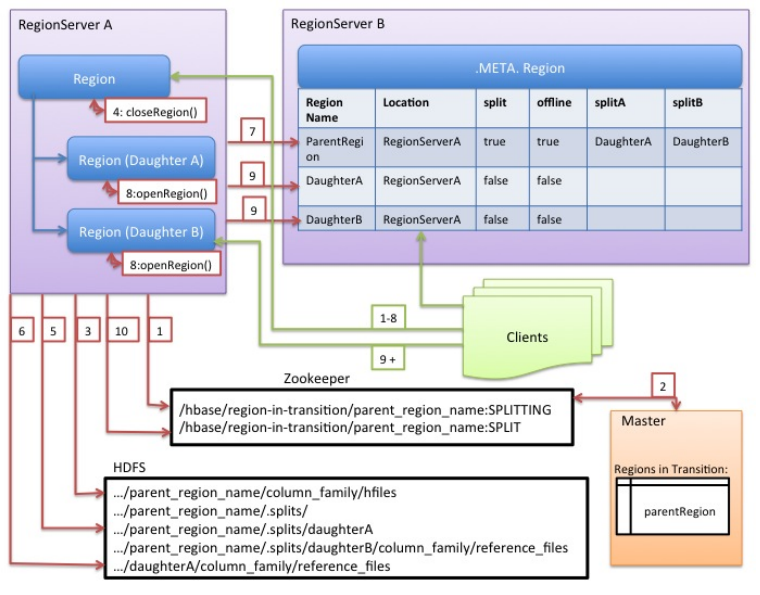
Although splitting the region is a local decision made by the RegionServer, the split process itself must coordinate with many actors. The RegionServer notifies the Master before and after the split, updates the .META. table so that clients can discover the new daughter regions, and rearranges the directory structure and data files in HDFS. Splitting is a multi-task process. To enable rollback in case of an error, the RegionServer keeps an in-memory journal about the execution state. The steps taken by the RegionServer to execute the split are illustrated in the "RegionServer Split Process" schema below. Each step is labeled with its step number. Actions from RegionServers or Master are shown in red, while actions from the clients are shown in green.
The RegionServer decides locally to split the region, and prepares the split. THE SPLIT TRANSACTION IS STARTED. As a first step, the RegionServer acquires a shared read lock on the table to prevent schema modifications during the splitting process. Then it creates a znode in zookeeper under /hbase/region-in-transition/region-name, and sets the znode's state to SPLITTING.
The Master learns about this znode, since it has a watcher for the parent region-in-transition znode.
The RegionServer creates a sub-directory named .splits under the parent's region directory in HDFS.
The RegionServer closes the parent region and marks the region as offline in its local data structures. THE SPLITTING REGION IS NOW OFFLINE. At this point, client requests coming to the parent region will throw NotServingRegionException. The client will retry with some backoff. The closing region is flushed.
The RegionServer creates region directories under the .splits directory, for daughter regions A and B, and creates necessary data structures. Then it splits the store files, in the sense that it creates two Reference files per store file in the parent region. Those reference files will point to the parent region's files.
The RegionServer creates the actual region directory in HDFS, and moves the reference files for each daughter.
The RegionServer sends a Put request to the .META. table, to set the parent as offline in the .META. table and add information about daughter regions. At this point, there won't be individual entries in .META. for the daughters. Clients will see that the parent region is split if they scan .META., but won't know about the daughters until they appear in .META.. Also, if this Put to .META. succeeds, the parent will be effectively split. If the RegionServer fails before this RPC succeeds, Master and the next Region Server opening the region will clean dirty state about the region split. After the .META. update, though, the region split will be rolled-forward by Master.
The RegionServer opens daughters A and B in parallel.
The RegionServer adds the daughters A and B to .META., together with information that it hosts the regions. THE SPLIT REGIONS (DAUGHTERS WITH REFERENCES TO PARENT) ARE NOW ONLINE. After this point, clients can discover the new regions and issue requests to them. Clients cache the .META. entries locally, but when they make requests to the RegionServer or .META., their caches will be invalidated, and they will learn about the new regions from .META..
The RegionServer updates znode /hbase/region-in-transition/region-name in ZooKeeper to state SPLIT, so that the master can learn about it. The balancer can freely re-assign the daughter regions to other region servers if necessary. THE SPLIT TRANSACTION IS NOW FINISHED.
After the split, .META. and HDFS will still contain references to the parent region. Those references will be removed when compactions in daughter regions rewrite the data files. Garbage collection tasks in the master periodically check whether the daughter regions still refer to the parent region's files. If not, the parent region will be removed.
The Write Ahead Log (WAL) records all changes to data in HBase, to file-based storage. Under normal operations, the WAL is not needed because data changes move from the MemStore to StoreFiles. However, if a RegionServer crashes or becomes unavailable before the MemStore is flushed, the WAL ensures that the changes to the data can be replayed. If writing to the WAL fails, the entire operation to modify the data fails.
HBase uses an implementation of the WAL interface. Usually, there is only one instance of a WAL per RegionServer. An exception is the RegionServer that is carrying hbase:meta; the meta table gets its own dedicated WAL. The RegionServer records Puts and Deletes to its WAL, before recording them these Mutations MemStore for the affected Store.
The HLog
Prior to 2.0, the interface for WALs in HBase was named HLog. In 0.94, HLog was the name of the
implementation of the WAL. You will likely find references to the HLog in documentation tailored
to these older versions.
The WAL resides in HDFS in the /hbase/WALs/ directory, with subdirectories per RegionServer.
For more general information about the concept of write ahead logs, see the Wikipedia Write-Ahead Log article.
In HBase, there are a number of WAL implementations (or 'Providers'). Each is known by a short name label (that unfortunately is not always descriptive). You set the provider in hbase-site.xml passing the WAL provider short-name as the value on the hbase.wal.provider property (Set the provider for hbase:meta using the hbase.wal.meta_provider property, otherwise it uses the same provider configured by hbase.wal.provider).
asyncfs: The default. New since hbase-2.0.0 (HBASE-15536, HBASE-14790). This AsyncFSWAL provider, as it identifies itself in RegionServer logs, is built on a new non-blocking dfsclient implementation. It is currently resident in the hbase codebase but intent is to move it back up into HDFS itself. WALs edits are written concurrently ("fan-out") style to each of the WAL-block replicas on each DataNode rather than in a chained pipeline as the default client does. Latencies should be better. See Apache HBase Improvements and Practices at Xiaomi at slide 14 onward for more detail on implementation.
filesystem: This was the default in hbase-1.x releases. It is built on the blocking DFSClient and writes to replicas in classic DFSCLient pipeline mode. In logs it identifies as FSHLog or FSHLogProvider.
multiwal: This provider is made of multiple instances of asyncfs or filesystem. See the next section for more on multiwal.
Look for the lines like the below in the RegionServer log to see which provider is in place (The below shows the default AsyncFSWALProvider):
2018-04-02 13:22:37,983 INFO [regionserver/ve0528:16020] wal.WALFactory: Instantiating WALProvider of type class org.apache.hadoop.hbase.wal.AsyncFSWALProvider
As the AsyncFSWAL hacks into the internal of DFSClient implementation, it will be easily broken
by upgrading the hadoop dependencies, even for a simple patch release. So if you do not specify
the wal provider explicitly, we will first try to use the asyncfs, if failed, we will fall back
to use filesystem. And notice that this may not always work, so if you still have problem
starting HBase due to the problem of starting AsyncFSWAL, please specify filesystem explicitly
in the config file.
EC support has been added to hadoop-3.x, and it is incompatible with WAL as the EC output stream
does not support hflush/hsync. In order to create a non-EC file in an EC directory, we need to use
the new builder-based create API for FileSystem, but it is only introduced in hadoop-2.9+ and
for HBase we still need to support hadoop-2.7.x. So please do not enable EC for the WAL directory
until we find a way to deal with it.
With a single WAL per RegionServer, the RegionServer must write to the WAL serially, because HDFS files must be sequential. This causes the WAL to be a performance bottleneck.
HBase 1.0 introduces support MultiWal in HBASE-5699. MultiWAL allows a RegionServer to write multiple WAL streams in parallel, by using multiple pipelines in the underlying HDFS instance, which increases total throughput during writes. This parallelization is done by partitioning incoming edits by their Region. Thus, the current implementation will not help with increasing the throughput to a single Region.
RegionServers using the original WAL implementation and those using the MultiWAL implementation can each handle recovery of either set of WALs, so a zero-downtime configuration update is possible through a rolling restart.
A RegionServer serves many regions. All of the regions in a region server share the same active WAL file. Each edit in the WAL file includes information about which region it belongs to. When a region is opened, the edits in the WAL file which belong to that region need to be replayed. Therefore, edits in the WAL file must be grouped by region so that particular sets can be replayed to regenerate the data in a particular region. The process of grouping the WAL edits by region is called log splitting. It is a critical process for recovering data if a region server fails.
Log splitting is done by the HMaster during cluster start-up or by the ServerShutdownHandler as a region server shuts down. So that consistency is guaranteed, affected regions are unavailable until data is restored. All WAL edits need to be recovered and replayed before a given region can become available again. As a result, regions affected by log splitting are unavailable until the process completes.
Renaming the directory is important because a RegionServer may still be up and accepting requests even if the HMaster thinks it is down. If the RegionServer does not respond immediately and does not heartbeat its ZooKeeper session, the HMaster may interpret this as a RegionServer failure. Renaming the logs directory ensures that existing, valid WAL files which are still in use by an active but busy RegionServer are not written to by accident.
The new directory is named according to the following pattern:
/hbase/WALs/HOST,PORT,STARTCODE-splitting
An example of such a renamed directory might look like the following:
The log splitter reads the log file one edit entry at a time and puts each edit entry into the buffer corresponding to the edit's region. At the same time, the splitter starts several writer threads. Writer threads pick up a corresponding buffer and write the edit entries in the buffer to a temporary recovered edit file. The temporary edit file is stored to disk with the following naming pattern:
/hbase/TABLE_NAME/REGION_ID/recovered.edits/.temp
This file is used to store all the edits in the WAL log for this region. After log splitting completes, the .temp file is renamed to the sequence ID of the first log written to the file.
To determine whether all edits have been written, the sequence ID is compared to the sequence of the last edit that was written to the HFile. If the sequence of the last edit is greater than or equal to the sequence ID included in the file name, it is clear that all writes from the edit file have been completed.
When the region is opened, the recovered.edits folder is checked for recovered edits files. If any such files are present, they are replayed by reading the edits and saving them to the MemStore. After all edit files are replayed, the contents of the MemStore are written to disk (HFile) and the edit files are deleted.
If an EOFException occurs while splitting logs, the split proceeds even when hbase.hlog.split.skip.errors is set to false. An EOFException while reading the last log in the set of files to split is likely, because the RegionServer was likely in the process of writing a record at the time of a crash. For background, see HBASE-2643 Figure how to deal with eof splitting logs
WAL log splitting and recovery can be resource intensive and take a long time, depending on the number of RegionServers involved in the crash and the size of the regions. Distributed log splitting was developed to improve performance during log splitting.
Distributed log processing is enabled by default since HBase 0.92. The setting is controlled by the hbase.master.distributed.log.splitting property, which can be set to true or false, but defaults to true.
After HBASE-20610, we introduce a new way to do WAL splitting coordination by procedureV2 framework. This can simplify the process of WAL splitting and no need to connect zookeeper any more.
Currently, splitting WAL processes are coordinated by zookeeper. Each region server are trying to grab tasks from zookeeper. And the burden becomes heavier when the number of region server increase.
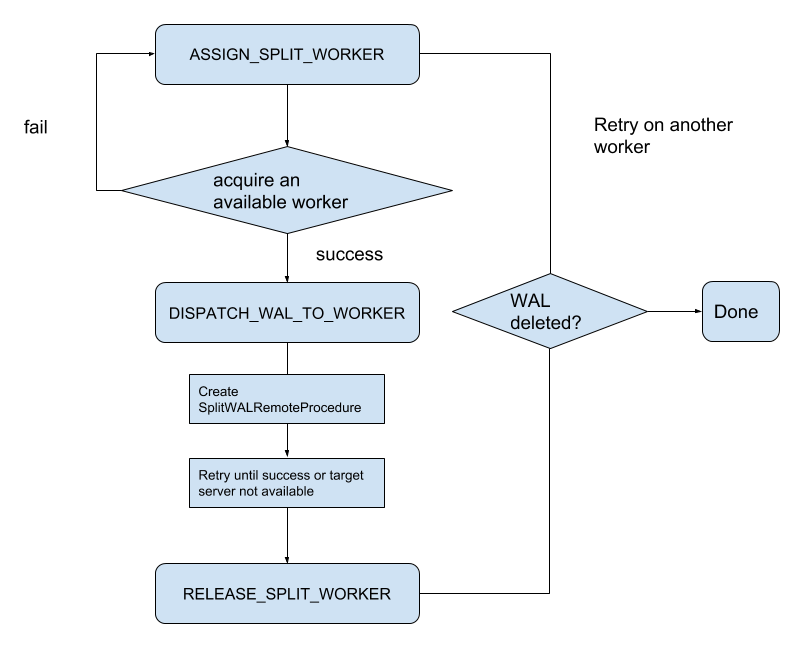
During ServerCrashProcedure, SplitWALManager will create one SplitWALProcedure for each WAL file which should be split. Then each SplitWALProcedure will spawn a SplitWalRemoteProcedure to send the request to region server. SplitWALProcedure is a StateMachineProcedure and here is the state transfer diagram.
Region Server will receive a SplitWALCallable and execute it, which is much more straightforward than before. It will return null if success and return exception if there is any error.
According to tests on a cluster which has 5 regionserver and 1 master. procedureV2 coordinated WAL splitting has a better performance than ZK coordinated WAL splitting no master when restarting the whole cluster or one region server crashing.
To enable this feature, first we should ensure our package of HBase already contains these code. If not, please upgrade the package of HBase cluster without any configuration change first. Then change configuration 'hbase.split.wal.zk.coordinated' to false. Rolling upgrade the master with new configuration. Now WAL splitting are handled by our new implementation. But region server are still trying to grab tasks from zookeeper, we can rolling upgrade the region servers with the new configuration to stop that.
Steps as follows:
Upgrade whole cluster to get the new Implementation.
Upgrade Master with new configuration 'hbase.split.wal.zk.coordinated'=false.
Upgrade region server to stop grab tasks from zookeeper.
The content of the WAL can be compressed using LRU Dictionary compression. This can be used to speed up WAL replication to different datanodes. The dictionary can store up to 215 elements; eviction starts after this number is exceeded.
To enable WAL compression, set the hbase.regionserver.wal.enablecompression property to true. The default value for this property is false. By default, WAL tag compression is turned on when WAL compression is enabled. You can turn off WAL tag compression by setting the hbase.regionserver.wal.tags.enablecompression property to 'false'.
A possible downside to WAL compression is that we lose more data from the last block in the WAL if it is ill-terminated mid-write. If entries in this last block were added with new dictionary entries but we failed persist the amended dictionary because of an abrupt termination, a read of this last block may not be able to resolve last-written entries.
It is possible to set durability on each Mutation or on a Table basis. Options include:
SKIP_WAL: Do not write Mutations to the WAL (See the next section, Disabling the WAL).
ASYNC_WAL: Write the WAL asynchronously; do not hold-up clients waiting on the sync of their write to the filesystem but return immediately. The edit becomes visible. Meanwhile, in the background, the Mutation will be flushed to the WAL at some time later. This option currently may lose data. See HBASE-16689.
SYNC_WAL: The default. Each edit is sync'd to HDFS before we return success to the client.
FSYNC_WAL: Each edit is fsync'd to HDFS and the filesystem before we return success to the client.
Do not confuse the ASYNC_WAL option on a Mutation or Table with the AsyncFSWAL writer; they are distinct options unfortunately closely named
HBASE-17437 added support for specifying a WAL directory outside the HBase root directory or even in a different FileSystem since 1.3.3/2.0+. Some FileSystems (such as Amazon S3) don't support append or consistent writes, in such scenario WAL directory needs to be configured in a different FileSystem to avoid loss of writes.
Following configurations are added to accomplish this:
hbase.wal.dir
This defines where the root WAL directory is located, could be on a different FileSystem than the root directory. WAL directory can not be set to a subdirectory of the root directory. The default value of this is the root directory if unset.
hbase.rootdir.perms
Configures FileSystem permissions to set on the root directory. This is '700' by default.
hbase.wal.dir.perms
Configures FileSystem permissions to set on the WAL directory FileSystem. This is '700' by default.
While migrating to custom WAL dir (outside the HBase root directory or a different FileSystem)
existing WAL files must be copied manually to new WAL dir, otherwise it may lead to data
loss/inconsistency as HMaster has no information about previous WAL directory.
It is possible to disable the WAL, to improve performance in certain specific situations. However, disabling the WAL puts your data at risk. The only situation where this is recommended is during a bulk load. This is because, in the event of a problem, the bulk load can be re-run with no risk of data loss.
The WAL is disabled by calling the HBase client field Mutation.writeToWAL(false). Use the Mutation.setDurability(Durability.SKIP_WAL) and Mutation.getDurability() methods to set and get the field's value. There is no way to disable the WAL for only a specific table.
If you disable the WAL for anything other than bulk loads, your data is at risk.