Timeline-consistent High Available Reads
Using region replicas to achieve high availability for reads with timeline consistency, reducing read unavailability during failures.
Introduction
HBase, architecturally, always had the strong consistency guarantee from the start. All reads and writes are routed through a single region server, which guarantees that all writes happen in an order, and all reads are seeing the most recent committed data.
However, because of this single homing of the reads to a single location, if the server becomes unavailable, the regions of the table that were hosted in the region server become unavailable for some time. There are three phases in the region recovery process - detection, assignment, and recovery. Of these, the detection is usually the longest and is presently in the order of 20-30 seconds depending on the ZooKeeper session timeout. During this time and before the recovery is complete, the clients will not be able to read the region data.
However, for some use cases, either the data may be read-only, or doing reads against some stale data is acceptable. With timeline-consistent high available reads, HBase can be used for these kind of latency-sensitive use cases where the application can expect to have a time bound on the read completion.
For achieving high availability for reads, HBase provides a feature called region replication. In this model, for each region of a table, there will be multiple replicas that are opened in different RegionServers. By default, the region replication is set to 1, so only a single region replica is deployed and there will not be any changes from the original model. If region replication is set to 2 or more, then the master will assign replicas of the regions of the table. The Load Balancer ensures that the region replicas are not co-hosted in the same region servers and also in the same rack (if possible).
All of the replicas for a single region will have a unique replicaid, starting from 0. The region replica having replica_id==0 is called the primary region, and the others _secondary regions or secondaries. Only the primary can accept writes from the client, and the primary will always contain the latest changes. Since all writes still have to go through the primary region, the writes are not highly-available (meaning they might block for some time if the region becomes unavailable).
Timeline Consistency
With this feature, HBase introduces a Consistency definition, which can be provided per read operation (get or scan).
public enum Consistency {
    STRONG,
    TIMELINE
}
Consistency.STRONG is the default consistency model provided by HBase. In case the table has region replication = 1, or in a table with region replicas but the reads are done with this consistency, the read is always performed by the primary regions, so that there will not be any change from the previous behaviour, and the client always observes the latest data.
In case a read is performed with Consistency.TIMELINE, then the read RPC will be sent to the primary region server first. After a short interval (hbase.client.primaryCallTimeout.get, 10ms by default), parallel RPC for secondary region replicas will also be sent if the primary does not respond back. After this, the result is returned from whichever RPC is finished first. If the response came back from the primary region replica, we can always know that the data is latest. For this Result.isStale() API has been added to inspect the staleness. If the result is from a secondary region, then Result.isStale() will be set to true. The user can then inspect this field to possibly reason about the data.
In terms of semantics, TIMELINE consistency as implemented by HBase differs from pure eventual consistency in these respects:
- Single homed and ordered updates: Region replication or not, on the write side, there is still only 1 defined replica (primary) which can accept writes. This replica is responsible for ordering the edits and preventing conflicts. This guarantees that two different writes are not committed at the same time by different replicas and the data diverges. With this, there is no need to do read-repair or last-timestamp-wins kind of conflict resolution.
- The secondaries also apply the edits in the order that the primary committed them. This way the secondaries will contain a snapshot of the primaries data at any point in time. This is similar to RDBMS replications and even HBase's own multi-datacenter replication, however in a single cluster.
- On the read side, the client can detect whether the read is coming from up-to-date data or is stale data. Also, the client can issue reads with different consistency requirements on a per-operation basis to ensure its own semantic guarantees.
- The client can still observe edits out-of-order, and can go back in time, if it observes reads from one secondary replica first, then another secondary replica. There is no stickiness to region replicas or a transaction-id based guarantee. If required, this can be implemented later though.
Timeline Consistency
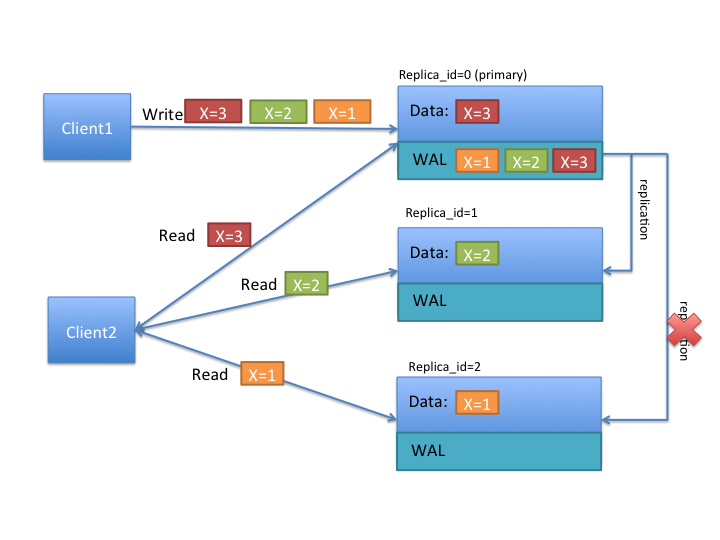
To better understand the TIMELINE semantics, let's look at the above diagram. Let's say that there are two clients, and the first one writes x=1 at first, then x=2 and x=3 later. As above, all writes are handled by the primary region replica. The writes are saved in the write ahead log (WAL), and replicated to the other replicas asynchronously. In the above diagram, notice that replica_id=1 received 2 updates, and its data shows that x=2, while the replica_id=2 only received a single update, and its data shows that x=1.
If client1 reads with STRONG consistency, it will only talk with the replica_id=0, and thus is guaranteed to observe the latest value of x=3. In case of a client issuing TIMELINE consistency reads, the RPC will go to all replicas (after primary timeout) and the result from the first response will be returned back. Thus the client can see either 1, 2 or 3 as the value of x. Let's say that the primary region has failed and log replication cannot continue for some time. If the client does multiple reads with TIMELINE consistency, she can observe x=2 first, then x=1, and so on.
Tradeoffs
Having secondary regions hosted for read availability comes with some tradeoffs which should be carefully evaluated per use case. Following are advantages and disadvantages.
Advantages:
- High availability for read-only tables
- High availability for stale reads
- Ability to do very low latency reads with very high percentile (99.9%+) latencies for stale reads
Disadvantages:
- Double / Triple MemStore usage (depending on region replication count) for tables with region replication > 1
- Increased block cache usage
- Extra network traffic for log replication
- Extra backup RPCs for replicas
To serve the region data from multiple replicas, HBase opens the regions in secondary mode in the region servers. The regions opened in secondary mode will share the same data files with the primary region replica, however each secondary region replica will have its own MemStore to keep the unflushed data (only primary region can do flushes). Also to serve reads from secondary regions, the blocks of data files may be also cached in the block caches for the secondary regions.
Where is the code
This feature is delivered in two phases, Phase 1 and 2. The first phase is done in time for HBase-1.0.0 release. Meaning that using HBase-1.0.x, you can use all the features that are marked for Phase 1. Phase 2 is committed in HBase-1.1.0, meaning all HBase versions after 1.1.0 should contain Phase 2 items.
Propagating writes to region replicas
As discussed above writes only go to the primary region replica. For propagating the writes from the primary region replica to the secondaries, there are two different mechanisms. For read-only tables, you do not need to use any of the following methods. Disabling and enabling the table should make the data available in all region replicas. For mutable tables, you have to use only one of the following mechanisms: storefile refresher, or async wal replication. The latter is recommended.
StoreFile Refresher
The first mechanism is store file refresher which is introduced in HBase-1.0+. Store file refresher is a thread per region server, which runs periodically, and does a refresh operation for the store files of the primary region for the secondary region replicas. If enabled, the refresher will ensure that the secondary region replicas see the new flushed, compacted or bulk loaded files from the primary region in a timely manner. However, this means that only flushed data can be read back from the secondary region replicas, and after the refresher is run, making the secondaries lag behind the primary for an a longer time.
For turning this feature on, you should configure hbase.regionserver.storefile.refresh.period to a non-zero value. See Configuration section below.
Async WAL replication
The second mechanism for propagation of writes to secondaries is done via the “Async WAL Replication” feature. It is only available in HBase-1.1+. This works similarly to HBase's multi-datacenter replication, but instead the data from a region is replicated to the secondary regions. Each secondary replica always receives and observes the writes in the same order that the primary region committed them. In some sense, this design can be thought of as “in-cluster replication”, where instead of replicating to a different datacenter, the data goes to secondary regions to keep secondary region's in-memory state up to date. The data files are shared between the primary region and the other replicas, so that there is no extra storage overhead. However, the secondary regions will have recent non-flushed data in their memstores, which increases the memory overhead. The primary region writes flush, compaction, and bulk load events to its WAL as well, which are also replicated through wal replication to secondaries. When they observe the flush/compaction or bulk load event, the secondary regions replay the event to pick up the new files and drop the old ones.
Committing writes in the same order as in primary ensures that the secondaries won't diverge from the primary regions data, but since the log replication is asynchronous, the data might still be stale in secondary regions.
Async WAL Replication is disabled by default. You can enable this feature by setting hbase.region.replica.replication.enabled to true.
Before 3.0.0, this feature works as a replication endpoint, the performance and latency characteristics is expected to be similar to inter-cluster replication. And once enabled, it will create a replication peer named region_replica_replication as a replication peer when you create a table with region replication > 1 for the first time.
if you want to disable this feature, you need to do two actions in the following order: * Set configuration property hbase.region.replica.replication.enabled to false in hbase-site.xml (see Configuration section below) * Disable the replication peer named region_replica_replication in the cluster using hbase shell or Admin class:
hbase> disable_peer 'region_replica_replication'In 3.0.0, this feature is re-implemented to decouple with the general replication framework. Now we do not need to create a special replication peer. And during rolling upgrading, we will remove this replication peer automatically if it is present. See HBASE-26233 and the design doc in our git repo for more details.
Async WAL Replication and the hbase:meta table is a little more involved and gets its own section below; see Region replication for META table's region
Store File TTL
In both of the write propagation approaches mentioned above, store files of the primary will be opened in secondaries independent of the primary region. So for files that the primary compacted away, the secondaries might still be referring to these files for reading. Both features are using HFileLinks to refer to files, but there is no protection (yet) for guaranteeing that the file will not be deleted prematurely. Thus, as a guard, you should set the configuration property hbase.master.hfilecleaner.ttl to a larger value, such as 1 hour to guarantee that you will not receive IOExceptions for requests going to replicas.
Region replication for META table's region
The general Async WAL Replication does not work for the META table's WAL. The meta table's secondary replicas refresh themselves from the persistent store files every hbase.regionserver.meta.storefile.refresh.period, (a non-zero value). Note how the META replication period is distinct from the user-space hbase.regionserver.storefile.refresh.period value.
Async WAL Replication for META table as of hbase-2.4.0+
Async WAL replication for META is added as a new feature in 2.4.0. Set hbase.region.replica.replication.catalog.enabled to enable async WAL Replication for META region replicas. It is off by default.
Regarding META replicas count, up to hbase-2.4.0, you would set the special property 'hbase.meta.replica.count'. Now you can alter the META table as you would a user-space table (if hbase.meta.replica.count is set, it will take precedent over what is set for replica count in the META table updating META replica count to match).
Async WAL Replication for META table as of hbase-3.0.0+
In HBASE-26233 we re-implemented the region replication framework to not rely on the general replication framework, so it can work together with META table as well. The code described in the above section have been removed mostly, but the config hbase.region.replica.replication.catalog.enabled is still kept, you could still use it to control whether to enable async wal replication for META table. And the ability to alter META table is also kept.
Load Balancing META table load
hbase-2.4.0 also adds a new client-side LoadBalance mode. When enabled client-side, clients will try to read META replicas first before falling back on the primary. Before this, the replica lookup mode — now named HedgedRead in hbase-2.4.0 — had clients read the primary and if no response after a configurable amount of time had elapsed, it would start up reads against the replicas. Starting from hbase-2.4.12(and all higher minor versions), with client-side LoadBalance mode, clients load balance META scan requests across all META replica regions, including the primary META region. In case of exceptions such as NotServingRegionException, it will fall back on the primary META region.
The new 'LoadBalance' mode helps alleviate hotspotting on the META table distributing META read load.
To enable the meta replica locator's load balance mode, please set the following configuration at on the client-side (only): set 'hbase.locator.meta.replicas.mode' to "LoadBalance". Valid options for this configuration are None, HedgedRead, and LoadBalance. Option parse is case insensitive. The default mode is None (which falls through to HedgedRead, the current default). Do NOT put this configuration in any hbase server-side's configuration, Master or RegionServer (Master could make decisions based off stale state — to be avoided).
Memory accounting
The secondary region replicas refer to the data files of the primary region replica, but they have their own memstores (in HBase-1.1+) and uses block cache as well. However, one distinction is that the secondary region replicas cannot flush the data when there is memory pressure for their memstores. They can only free up memstore memory when the primary region does a flush and this flush is replicated to the secondary. Since in a region server hosting primary replicas for some regions and secondaries for some others, the secondaries might cause extra flushes to the primary regions in the same host. In extreme situations, there can be no memory left for adding new writes coming from the primary via wal replication. For unblocking this situation (and since secondary cannot flush by itself), the secondary is allowed to do a “store file refresh” by doing a file system list operation to pick up new files from primary, and possibly dropping its memstore. This refresh will only be performed if the memstore size of the biggest secondary region replica is at least hbase.region.replica.storefile.refresh.memstore.multiplier (default 4) times bigger than the biggest memstore of a primary replica. One caveat is that if this is performed, the secondary can observe partial row updates across column families (since column families are flushed independently). The default should be good to not do this operation frequently. You can set this value to a large number to disable this feature if desired, but be warned that it might cause the replication to block forever.
Secondary replica failover
When a secondary region replica first comes online, or fails over, it may have served some edits from its memstore. Since the recovery is handled differently for secondary replicas, the secondary has to ensure that it does not go back in time before it starts serving requests after assignment. For doing that, the secondary waits until it observes a full flush cycle (start flush, commit flush) or a “region open event” replicated from the primary. Until this happens, the secondary region replica will reject all read requests by throwing an IOException with message “The region's reads are disabled”. However, the other replicas will probably still be available to read, thus not causing any impact for the rpc with TIMELINE consistency. To facilitate faster recovery, the secondary region will trigger a flush request from the primary when it is opened. The configuration property hbase.region.replica.wait.for.primary.flush (enabled by default) can be used to disable this feature if needed.
Configuration properties
To use highly available reads, you should set the following properties in hbase-site.xml file. There is no specific configuration to enable or disable region replicas. Instead you can change the number of region replicas per table to increase or decrease at the table creation or with alter table. The following configuration is for using async wal replication and using meta replicas of 3.
Server side properties
<property>
  <name>hbase.regionserver.storefile.refresh.period</name>
  <value>0</value>
  <description>
    The period (in milliseconds) for refreshing the store files for the secondary regions. 0 means this feature is disabled. Secondary regions sees new files (from flushes and compactions) from primary once the secondary region refreshes the list of files in the region (there is no notification mechanism). But too frequent refreshes might cause extra Namenode pressure. If the files cannot be refreshed for longer than HFile TTL (hbase.master.hfilecleaner.ttl) the requests are rejected. Configuring HFile TTL to a larger value is also recommended with this setting.
  </description>
</property>

<property>
  <name>hbase.regionserver.meta.storefile.refresh.period</name>
  <value>300000</value>
  <description>
    The period (in milliseconds) for refreshing the store files for the hbase:meta tables secondary regions. 0 means this feature is disabled. Secondary regions sees new files (from flushes and compactions) from primary once the secondary region refreshes the list of files in the region (there is no notification mechanism). But too frequent refreshes might cause extra Namenode pressure. If the files cannot be refreshed for longer than HFile TTL (hbase.master.hfilecleaner.ttl) the requests are rejected. Configuring HFile TTL to a larger value is also recommended with this setting. This should be a non-zero number if meta replicas are enabled.
  </description>
</property>

<property>
  <name>hbase.region.replica.replication.enabled</name>
  <value>true</value>
  <description>
    Whether asynchronous WAL replication to the secondary region replicas is enabled or not. If this is enabled, a replication peer named "region_replica_replication" will be created which will tail the logs and replicate the mutations to region replicas for tables that have region replication > 1. If this is enabled once, disabling this replication also requires disabling the replication peer using shell or Admin java class. Replication to secondary region replicas works over standard inter-cluster replication.
  </description>
</property>

<property>
  <name>hbase.master.hfilecleaner.ttl</name>
  <value>3600000</value>
  <description>
    The period (in milliseconds) to keep store files in the archive folder before deleting them from the file system.
  </description>
</property>

<property>
  <name>hbase.region.replica.storefile.refresh.memstore.multiplier</name>
  <value>4</value>
  <description>
    The multiplier for a "store file refresh" operation for the secondary region replica. If a region server has memory pressure, the secondary region will refresh it's store files if the memstore size of the biggest secondary replica is bigger this many times than the memstore size of the biggest primary replica. Set this to a very big value to disable this feature (not recommended).
  </description>
</property>

<property>
  <name>hbase.region.replica.wait.for.primary.flush</name>
  <value>true</value>
  <description>
    Whether to wait for observing a full flush cycle from the primary before start serving data in a secondary. Disabling this might cause the secondary region replicas to go back in time for reads between region movements.Please note that if you set per-table property `REGION_MEMSTORE_REPLICATION` to false,`hbase.region.replica.wait.for.primary.flush` will be ignored.
  </description>
</property>
One thing to keep in mind also is that, region replica placement policy is only enforced by the StochasticLoadBalancer which is the default balancer. If you are using a custom load balancer property in hbase-site.xml (hbase.master.loadbalancer.class) replicas of regions might end up being hosted in the same server.
Client side properties
Ensure to set the following for all clients (and servers) that will use region replicas.
<property>
  <name>hbase.ipc.client.specificThreadForWriting</name>
  <value>true</value>
  <description>
    Whether to enable interruption of RPC threads at the client side. This is required for region replicas with fallback RPC's to secondary regions.
  </description>
</property>
<property>
  <name>hbase.client.primaryCallTimeout.get</name>
  <value>10000</value>
  <description>
    The timeout (in microseconds), before secondary fallback RPC's are submitted for get requests with Consistency.TIMELINE to the secondary replicas of the regions. Defaults to 10ms. Setting this lower will increase the number of RPC's, but will lower the p99 latencies.
  </description>
</property>
<property>
  <name>hbase.client.primaryCallTimeout.multiget</name>
  <value>10000</value>
  <description>
    The timeout (in microseconds), before secondary fallback RPC's are submitted for multi-get requests (Table.get(List<Get>)) with Consistency.TIMELINE to the secondary replicas of the regions. Defaults to 10ms. Setting this lower will increase the number of RPC's, but will lower the p99 latencies.
  </description>
</property>
<property>
  <name>hbase.client.replicaCallTimeout.scan</name>
  <value>1000000</value>
  <description>
    The timeout (in microseconds), before secondary fallback RPC's are submitted for scan requests with Consistency.TIMELINE to the secondary replicas of the regions. Defaults to 1 sec. Setting this lower will increase the number of RPC's, but will lower the p99 latencies.
  </description>
</property>
<property>
  <name>hbase.meta.replicas.use</name>
  <value>true</value>
  <description>
    Whether to use meta table replicas or not. Default is false.
  </description>
</property>
Note HBase-1.0.x users should use hbase.ipc.client.allowsInterrupt rather than hbase.ipc.client.specificThreadForWriting.
User Interface
In the masters user interface, the region replicas of a table are also shown together with the primary regions. You can notice that the replicas of a region will share the same start and end keys and the same region name prefix. The only difference would be the appended replica_id (which is encoded as hex), and the region encoded name will be different. You can also see the replica ids shown explicitly in the UI.
Creating a table with region replication
Region replication is a per-table property. All tables have REGION_REPLICATION = 1 by default, which means that there is only one replica per region. You can set and change the number of replicas per region of a table by supplying the REGION_REPLICATION property in the table descriptor.
There is another per-table property REGION_MEMSTORE_REPLICATION.All tables have REGION_MEMSTORE_REPLICATION = true by default, which means the new data written to the primary region should be replicated. If you set this to false, replicas do not receive memstore updates from the primary RegionServer,they will only receive updates for events like flushes and bulkloads, and will not have access to data which the primary has not yet flushed. Please note that if you set REGION_MEMSTORE_REPLICATION to false,hbase.region.replica.wait.for.primary.flush will be ignored.
Shell
create 't1', 'f1', {REGION_REPLICATION => 2}

describe 't1'
for i in 1..100
put 't1', "r#{i}", 'f1:c1', i
end
flush 't1'
Java
HTableDescriptor htd = new HTableDescriptor(TableName.valueOf(“test_table”));
htd.setRegionReplication(2);
...
admin.createTable(htd);
You can also use setRegionReplication() and alter table to increase, decrease the region replication for a table.
Read API and Usage
Shell
You can do reads in shell using a the Consistency.TIMELINE semantics as follows
hbase(main):001:0> get 't1','r6', {CONSISTENCY => "TIMELINE"}You can simulate a region server pausing or becoming unavailable and do a read from the secondary replica:
$ kill -STOP <pid or primary region server>

hbase(main):001:0> get 't1','r6', {CONSISTENCY => "TIMELINE"}
Using scans is also similar
hbase> scan 't1', {CONSISTENCY => 'TIMELINE'}Java
You can set the consistency for Gets and Scans and do requests as follows.
Get get = new Get(row);
get.setConsistency(Consistency.TIMELINE);
...
Result result = table.get(get);
You can also pass multiple gets:
Get get1 = new Get(row);
get1.setConsistency(Consistency.TIMELINE);
...
ArrayList<Get> gets = new ArrayList<Get>();
gets.add(get1);
...
Result[] results = table.get(gets);
And Scans:
Scan scan = new Scan();
scan.setConsistency(Consistency.TIMELINE);
...
ResultScanner scanner = table.getScanner(scan);
You can inspect whether the results are coming from primary region or not by calling the Result.isStale() method:
Result result = table.get(get);
if (result.isStale()) {
  ...
}